
Insert
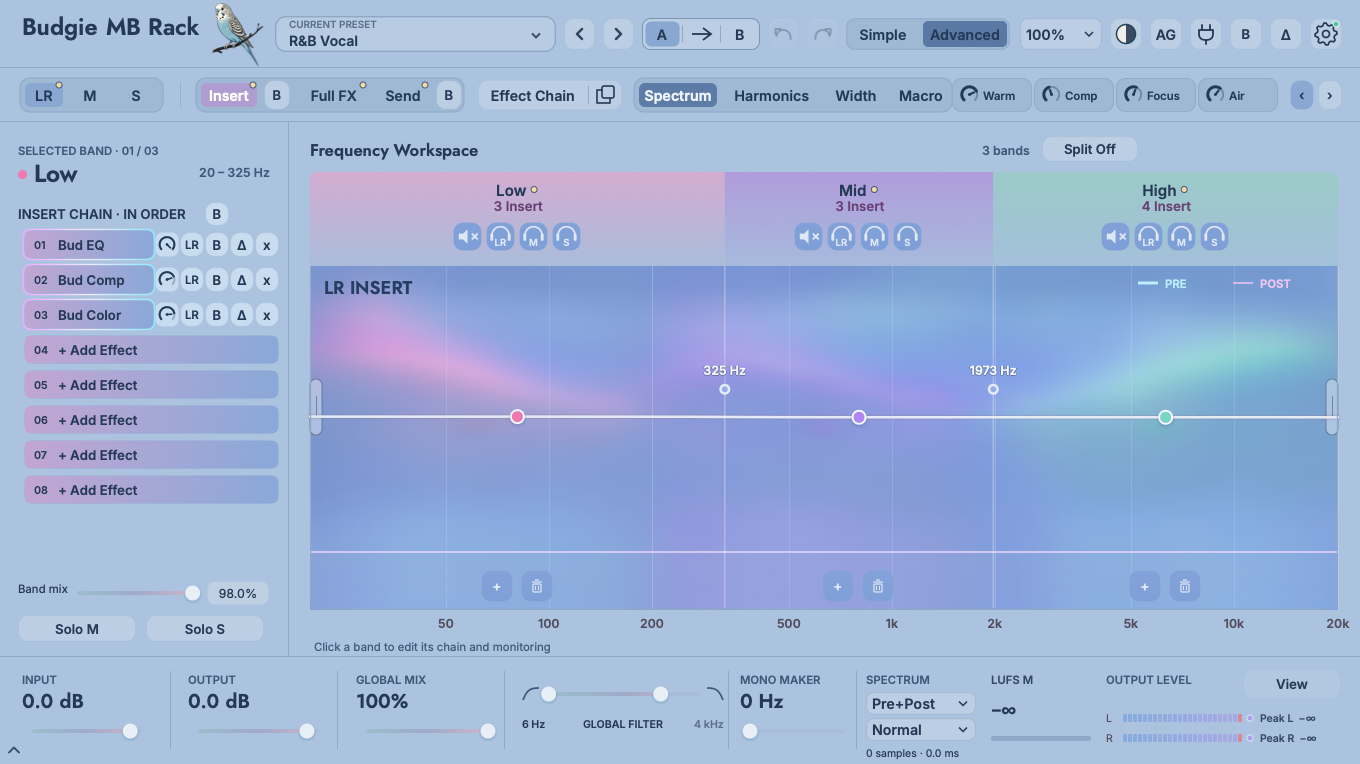
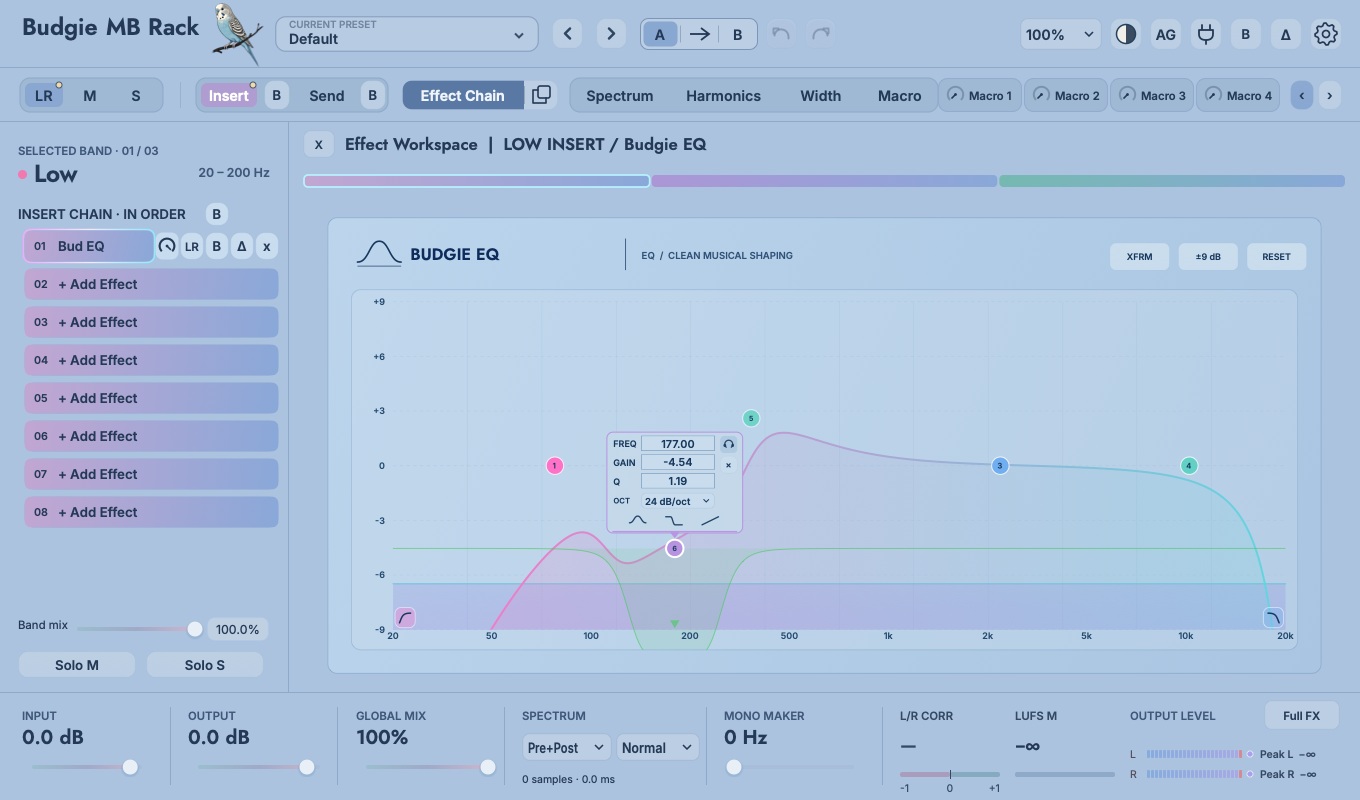
Each frequency band has 8 slots connected in series from 01→08. Suitable for direct shaping such as EQ, compression, coloration, clipping, etc.
 Budgie MB RackUser Manual
MULTIBAND EFFECT WORKSPACE
Budgie MB Rack combines 1–5 bands, independent LR / M / S processing, Insert chains, four Send pages, FULL FX, third-party plug-ins and 12 Budgie Essentials processor families in one visual workspace. Refine individual parameters in detail, or use eight Macros to control the complete chain from a single page.
01
Hear the right changes first before deciding whether to go deeper.
For vocals, start with R&B Vocal or Warm Vocal . Default is an empty rack for building your own setup.
The first six controls vary from preset to preset, and the last two are typically used for Echo and Space. Decide on the overall direction first, then go to Advanced.
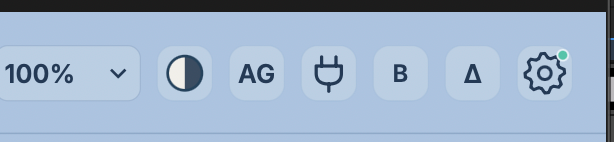
By default, AG measures three seconds of active audio and locks the loudness compensation. This helps prevent louder playback from biasing your judgement. Continuous automatic mode is available in Settings.
B compares the processed signal with rack bypass;Δ lets you hear the difference introduced by processing. Send reverb and delay tails remain audible.
Check out frequency bands, effects order, single-slot mixes, target channels, and macro mapping. Solve one listening problem at a time.
These controls operate at the rack level. Global B and Δ affect the entire rack; slot B and Δ affect one effect instance.
 1234567
02
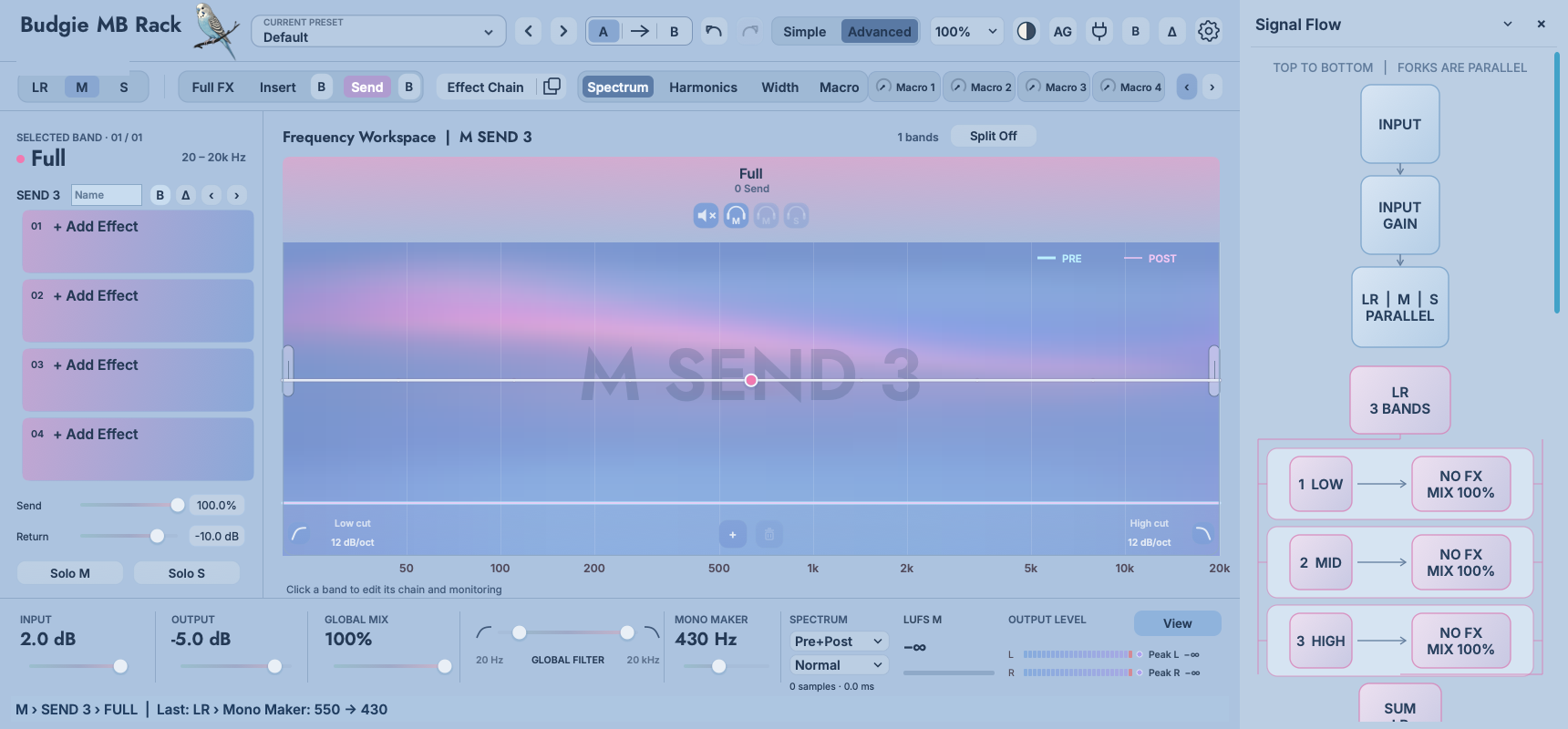
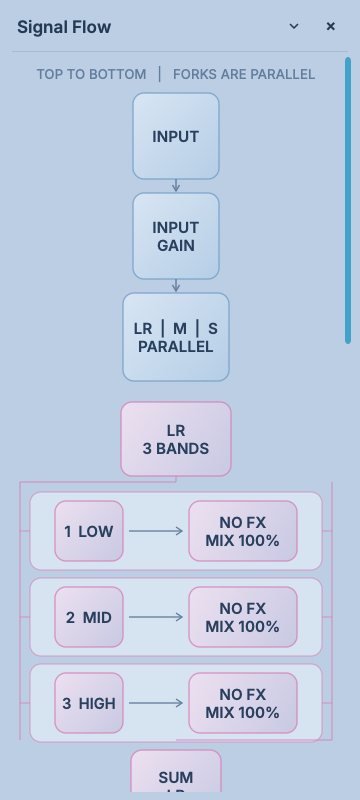
Read the actual routing directly in MB Rack’s Signal Flow view.
 123
123Each frequency band has 8 slots connected in series from 01→08. Suitable for direct shaping such as EQ, compression, coloration, clipping, etc.
Four pages of independent auxiliary chains. Each page saves sends, returns and effects slots by band and Full / Transient / Tonal, suitable for echo, reverb and parallel processing.
Eight full-range slots, positioned before multiband processing or after the routes are summed. Use them for overall EQ, bus coloration and final limiting.
LR handles full stereo; M handles the central common component; S handles left and right differences. Each of the three pages has Band, Insert, Send and Split.
Each LR/M/S page independently sets bands 1–5 and crossover frequency. Signal Flow lists each segment as currently configured.
After the three processing pages are summed, the signal enters the global output stage. Signal Flow lists Mono Maker, Auto Gain / Output, Global Mix, Bypass, Delta and Solo.
03
Determine where the sound is going before deciding where to place the effects.
Input sets the level entering the rack before crossover and effect processing. In PRE mode, the full stereo signal passes through the eight FULL FX slots before reaching the LR / M / S processing paths. Use this position for full-range corrective EQ, preamp coloration or overall dynamics. Its output becomes the shared input for all subsequent processing.
LR processes the full stereo signal, M receives the shared centre component, and S receives the difference between left and right. Each page has independent bands, crossover points, Insert chains, four Send pages and Split chains. The processing paths run in parallel from the same input and are phase-aligned before summing.
Each page divides its input into 1–5 bands using its own crossover points. Within a band, Full Insert slots run serially from 01 to 08. With Split enabled, the Full Insert output is separated into Transient and Tonal branches. Each branch has its own Insert / Send processing before recombination. Full Send receives the signal after both Insert and Split processing, including the preceding EQ, compression and transient changes.
Send 1–4 are four independent sets of auxiliary chains. Each band and each Full / Transient / Tonal partition can save its own send volume, return volume and up to four slots. Send Level determines how much signal enters the effects network, and Return determines the volume at which the signal returns to the main path after processing. Pulling the Send Level low will only stop new input, and the delay feedback and reverb tail will naturally decay.
With FULL FX set to POST, its eight-slot chain follows the combined multiband, M/S and Send processing. Use it for final limiting, bus glue or finishing EQ. The global output controls and analysis follow. Switching PRE / POST changes the processing order and can change the response of nonlinear effects; compare again at matched loudness.
04
Distinguish between adding a plug-in from the library and moving an effect that is already loaded.
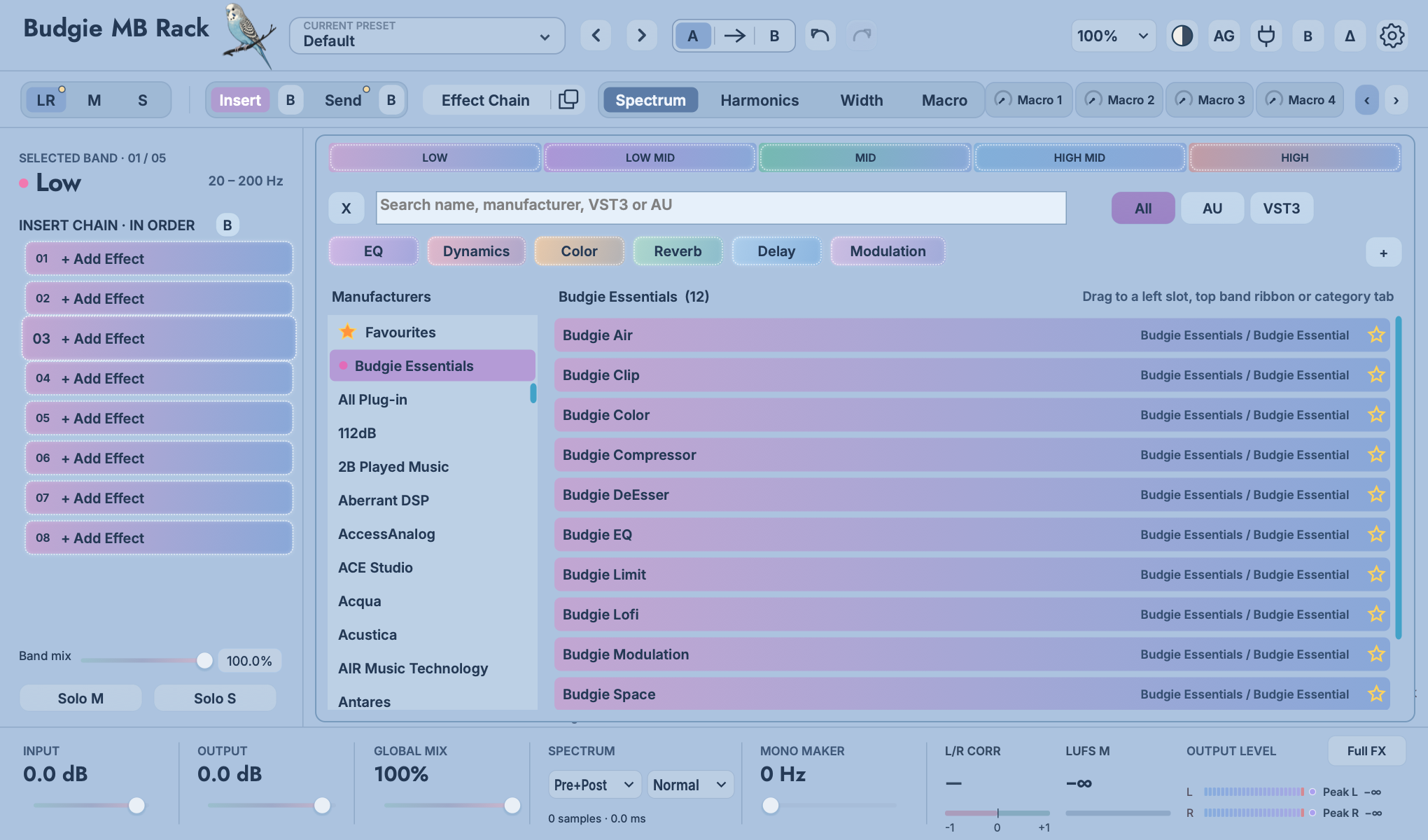
Press and hold the effect name in the plug-in library to start dragging. This interface only accepts three types of placement targets: specific slots on the left, top band Ribbon, and category labels. Release the target after a highlighted border appears; it will not load when there is no highlight.
 1234
1234Start dragging from the name of a loaded effect in the left-hand slot list. Drag normally to move it; hold Option / Alt while dragging to copy it. Copies retain plug-in state, slot Mix, target, Bypass and editor zoom. Valid destinations are indicated by a dashed outline, highlighted border or downward arrow.
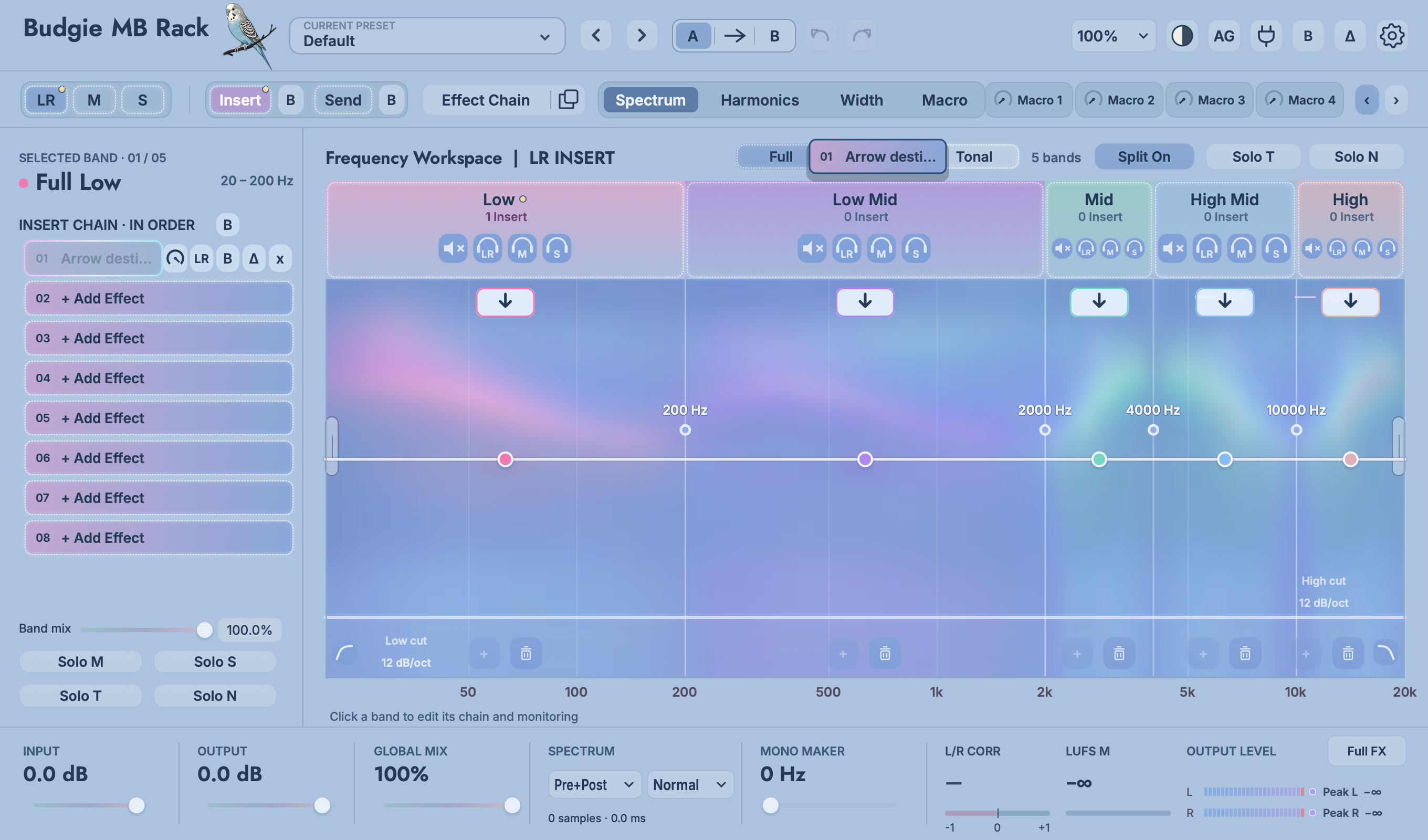 1234
1234| Destination | Result | Typical use |
|---|---|---|
| Another slot in the current chain | Reordering within the same chain; signals run from smallest to largest slot number. | Compare compression → coloration with coloration → compression. |
| Another band title / Ribbon | Move to the destination band while retaining the routing page, Split branch and Insert / Send chain type. | Move the low-frequency clip to the mid-low frequency, or copy the high-frequency space to an adjacent segment. |
| Insert/Send tag | Switch between Insert and Send in the current band and Split branch. Moving into Send uses the currently selected Send page. | Change the series reverb to an auxiliary return, or move the parallel compression into the main chain. |
| LR/M/S tag | Move to another processing page; the rack uses the source band center frequency to find the segment in the destination page that covers that frequency. | Copy LR high-frequency space to S, or move M vocal dynamics back to LR. |
| Full / Transient / Tonal | With Split enabled, change the processing branch. Downward arrows in the spectrum can specify both the branch and the band. | Have the Clip handle only the attack, or have the modulation work only on the sustain. |
| Plug-in library classification tags | Only the plug-in library category is changed, no instance is created in the chain. | Organize third-party plug-ins to shorten future selection time. |
When dragging over long distances is inconvenient, you can copy the loaded slot and paste it in the target empty slot. Ideal for reusing the same settings across complex Split or Send pages.
Reorder effects within the eight FULL FX slots. PRE / POST determines whether the complete chain runs before multiband processing or after summing.
The target border or arrow lights up to indicate that it is receivable. After releasing, check the slot name on the left, the routing page at the top, and the workspace title to confirm that the instance is in the expected location.
05
Global pages and single-slot targets are two different levels of M/S tools.
Click the M or S at the top to enter the corresponding page. Double-click the spectrum blank like LR or use the + at the bottom of the band to add a new band and drag the white crossover line to change the boundary. The number of frequency bands and crossover frequencies of M and S are independent of each other: for example, M can maintain a single segment of stable vocals and low frequencies, while S is divided into low/mid-high segments and only handles the side space. Page switching will not copy the LR crossover point.
Page-level M/S gives you a complete mid-side chain with independent monitoring. On the LR page, the small LR / M / S buttons beside each slot determine which component of the previous slot’s output that effect processes. For example, one LR chain can contain a full-stereo EQ, a Mid-only compressor and a Side-only Width effect. On the M and S pages, slot targets remain fixed to that page to avoid repeated encoding.
Let the M page keep the low frequency main and use a gentle clip or compression to control the central peak; the S page low frequency should be less processed or withdrawn with the Mono Maker. Don’t use S low-frequency direct mute as a fixed template. Check the real correlation and room information first.
Centered lead vocals are usually more pronounced in M, but kick, bass, and snare may also be present at the same time. M/S cannot "extract vocals". Use a narrow range, small movements, and full mix control to avoid lifting the kick drum all together for the sake of the front vocal.
Adding short reverb, doubler, or air in the 2–12 kHz band of page S can liven up the background and reflections while keeping the center stable. Mono is then checked; Side processing is reduced when folded.
06
Within each frequency band, the complete signal is split into two branches, Transient and Tonal, that can be processed independently.
Click Split Off to change it to Split On . The current LR / M / S page now offers Full, Transient and Tonal editing tabs. Full processes the complete band before separation. Transient focuses on attacks, percussion and rapid changes; Tonal contains the non-transient sustain, resonance and tails. Full Insert processes the signal before separation, so its EQ, compression and coloration also influence the separation result.
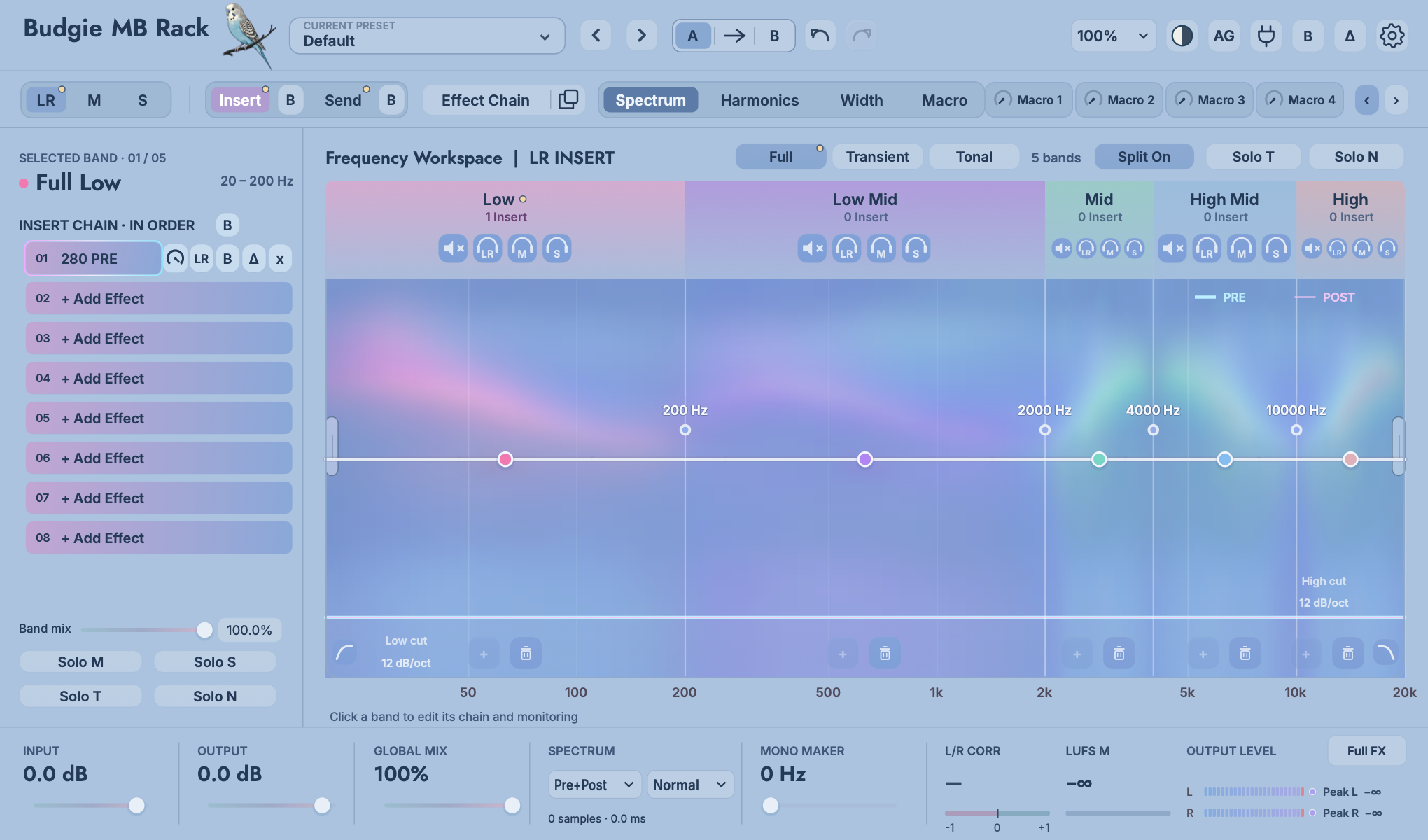 12345
12345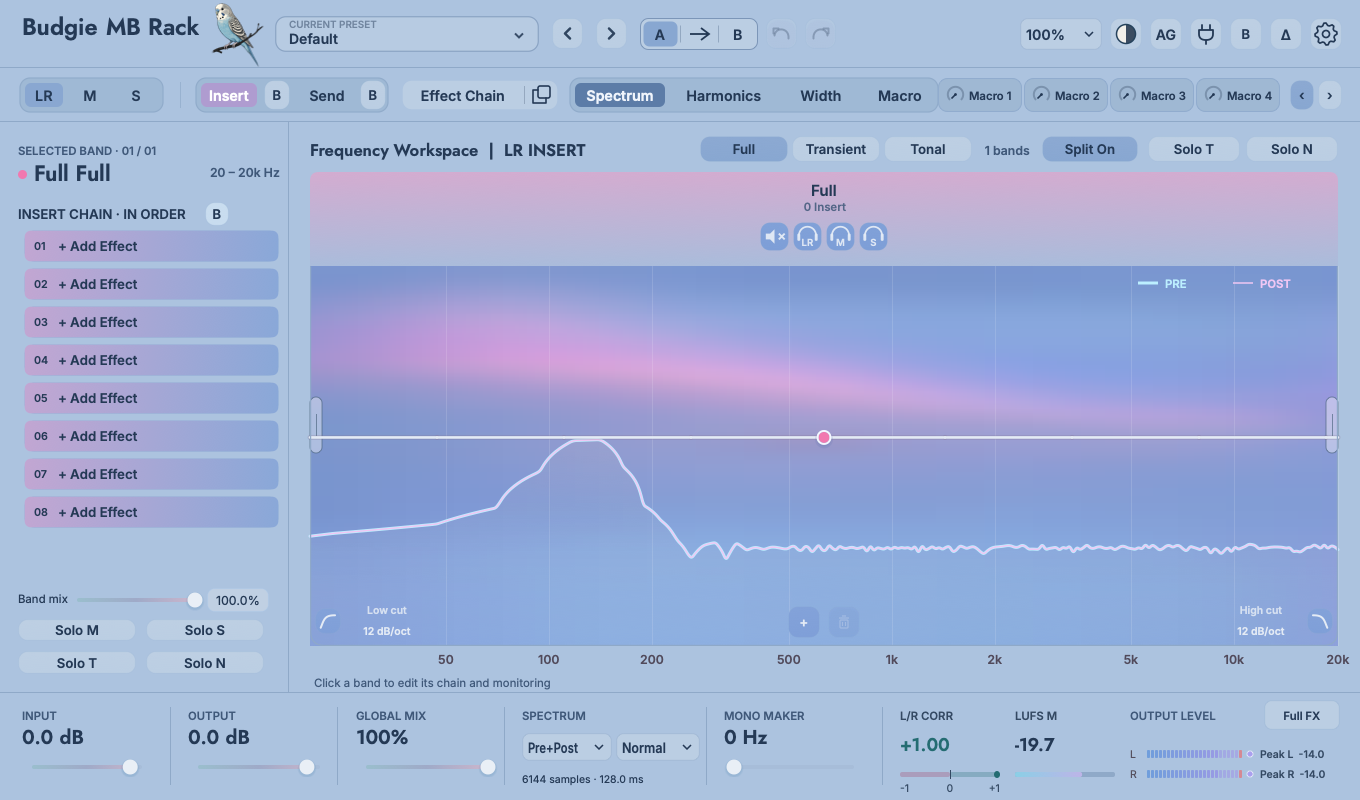 12
12| Control | Meaning | Typical processing |
|---|---|---|
| Full | Edit the complete chain of bands before splitting; only this layer is used when Split is off. | Common subtractive EQ, base gain, light dynamics that need to affect both at the same time. |
| Transient | Edit the independent Insert / Send chains for transient material. | Clipping, attack shaping, short rooms and control of brief peaks. |
| Tonal | Edit non-transient, sustained and tail branches. | Sustain compression, saturation, modulation, delay, long reverb and sustained resonance controls. |
| Solo T / Solo N (left) | Only monitor the Transient or Tonal of the currently selected frequency band. | Determine whether a certain section of separation captures the target. |
| Solo T / Solo N (top) | Monitor Transient or Tonal across all frequency bands of the current page. | Check structural balance across the entire LR, M or S page. |
07
One main canvas, four ways of seeing.
Displays pre/post processing curves, band boundaries, current LR/M/S, Full/Transient/Tonal partitions and the number of effects per band. Click the colored frequency band to select it; drag the white line with the Hz label to change the adjacent boundary; double-click the blank position to add a new crossover, and the + / trash can at the bottom can also add or delete frequency bands. Drag the frequency band dot up and down to change the Trim of the band, and double-click to return to 0 dB.
Measure sends a pure test tone through a separate copy of the rack and compares the odd and even harmonics generated above the fundamental. Use it to examine Color, Tape, Clip, XFRM and coloured compression. Music playback alone cannot identify newly generated harmonics.
Polar coordinates, left-right correlation, and Mid/Side energy help determine whether the stereo image is too narrow, too wide, or out of phase. It observes the final output and therefore reflects Width, Modulation, Space, S-page processing and Mono Maker simultaneously.
Manage mapping, range, direction, and curves for eight macros. One page reads three specific mappings at the same time; Up / Down switches more targets. Each mapping shows complete LR/M/S, Insert/Send, Full/Transient/Tonal, frequency range, slot and parameter location.
FEATURE GUIDE
The white handles set the lower and upper processing limits for the entire Rack. Full FX, Insert and Send share these settings.
Hover over either handle for guidance below the spectrum. Drag horizontally to adjust its frequency, or double-click to enter a precise value. Processing changes gradually diminish outside the range, returning towards the original signal. Low / High Cut instead removes frequencies from the output.
The white gain guide illustrates band gain settings and their range, with a smooth return towards 0 dB. It is not a measurement of hosted plug-ins or the complete effect chain. With all band gains at 0 dB and cuts disabled, the guide stays flat. Pre / Post spectra continue to display actual audio.
Changing the range adds no fixed processing latency. Isolated band and M/S auditions temporarily bypass it; normal output restores it. Judge the result using listening and the actual spectrum.
08
Simple is used to play the result, Advanced is used to create linkages.
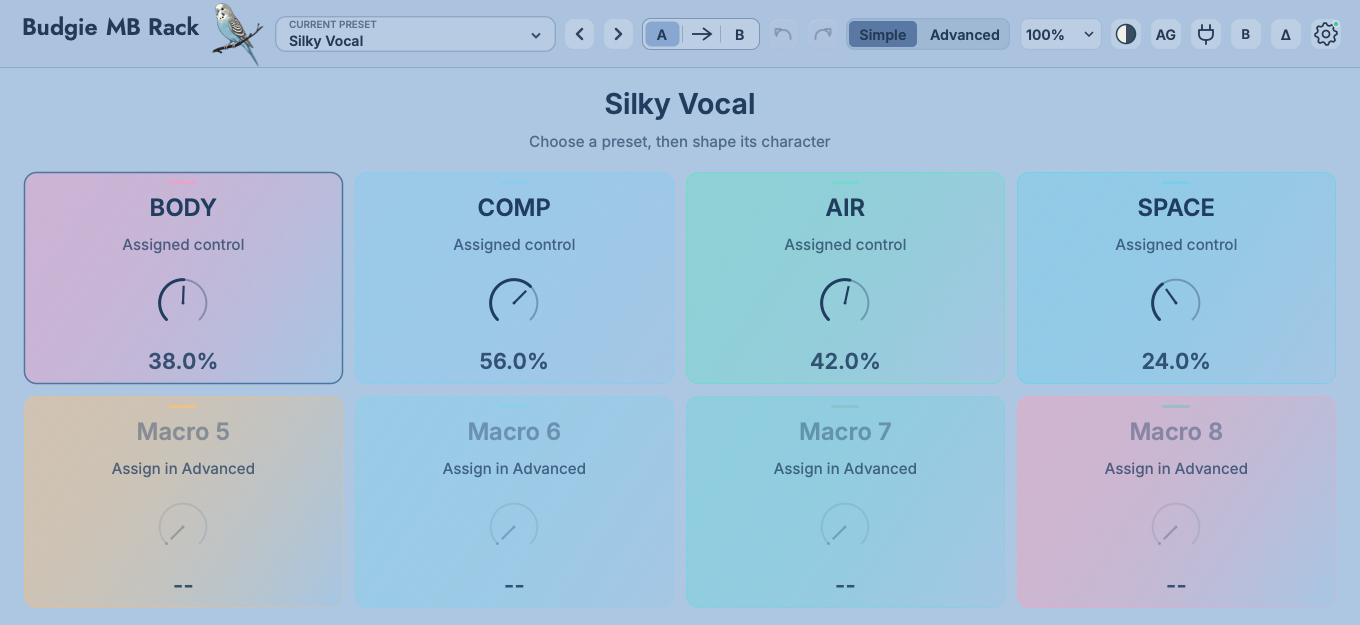
Each preset can have a custom name for the Macro, such as Warm, Comp, Focus, Air. A Macro can drive multiple parameters of different frequency bands and different effects at the same time. Each target has independent range, direction and curve. Simple retains the top bar dimensions with the Simple / Advanced toggle position, and the main body is about the compact height of Advanced.
Unmapped macros in Default remain blank, waiting for you to build an action. When creating a mapping, establish a relationship with the current value of the target to avoid jumping to the default value just after binding.
For example, “Closer” can increase Presence and compression while reducing Space. “Bigger” can increase low-band Clip input and drum Transient Mix while slightly reducing Output. Check peaks, tone and loudness at 0%, 50% and 100%.
 12
12The built-in processor and recognized third-party controls instantly create mappings and record LR/M/S, Insert/Send, Full/Transient/Tonal, bands, slots and parameters.
If the third-party editor cannot identify the control under the pointer, releasing enters “touch the next parameter” learning mode. Adjust the intended control next; MB Rack binds the automation parameter reported by the plug-in.
Go into the Macro workspace to check the complete location row. The mapping remains with the instance when the same instance is moved; when the instance is deleted, the target is no longer valid.
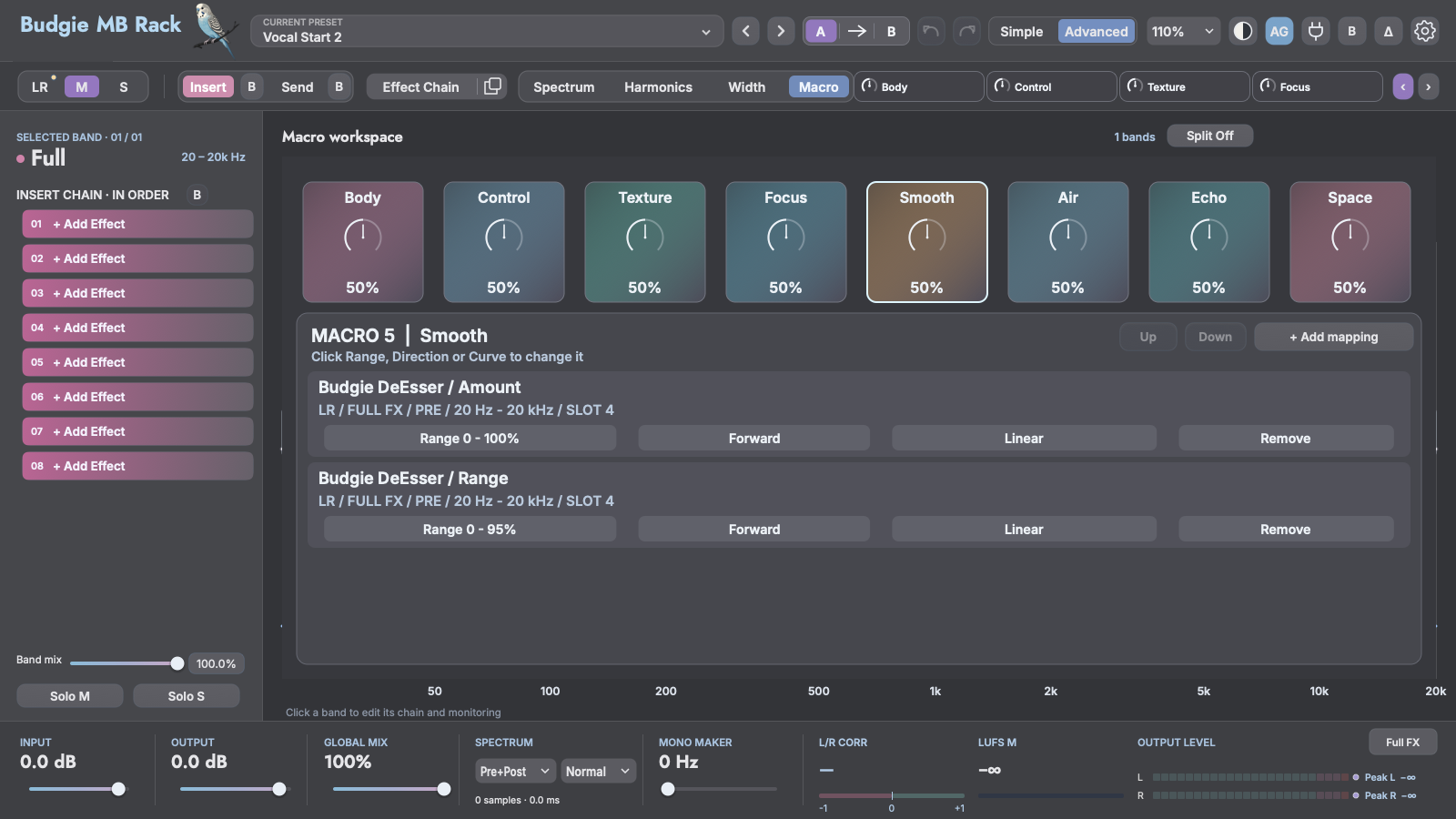 1234
1234Suitable:Turn "vocals further forward", "drums more impactful" and "space further" into a knob that can be automated and played.
Avoid:Push multiple Output, Makeup and Send in the same direction to the limit at the same time. First establish a stable gain structure in a single effect, and then use Macro to organize the action.
09
The bottom view is not a fixed page, but three switchable sidebars.
Click the bottom View button to reopen the last-used sidebar. Use the dropdown in the sidebar title to switch between Overview, History and Signal Flow . Click × at the upper right to close the sidebar and restore the original window width.
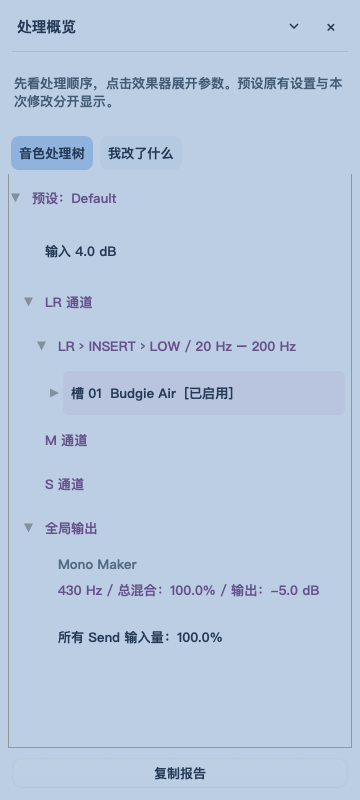
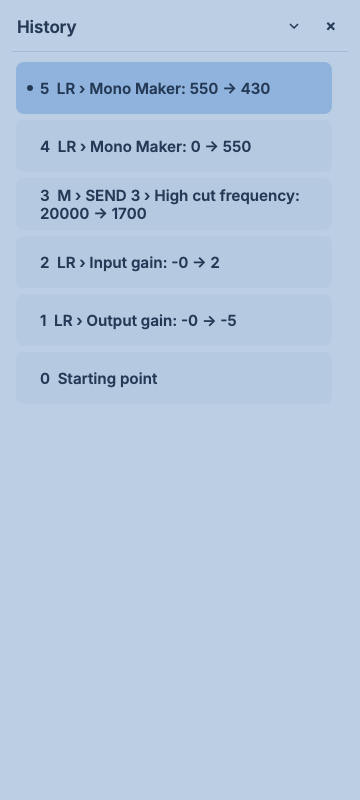
By default, automatic gain is locked after accumulating three seconds of active audio. It compensates for overall loudness and doesn't judge timbre for you.
Save two complete sets of states and switch between them on the fly; the arrows copy the current state to the other side.
Monitor the difference between the entire rack or a single slot being removed/added, suitable for detecting over-processing.
When expanded, recent operations are displayed; when collapsed, the plug-in window becomes shorter simultaneously, leaving no blank space.
Use the processing tree to check the current configuration, and use "What did I change" to distinguish the original preset from this adjustment.
Read the operation objects and values before and after one by one; suitable for comparing adjustment paths and returning to an earlier state.
Check the actual routing, branch and summing relationships to locate where the sound really passes.
The spectrum can be viewed as Pre, Post or Pre+Post; the output meter displays left and right levels, peak hold and related information.
10
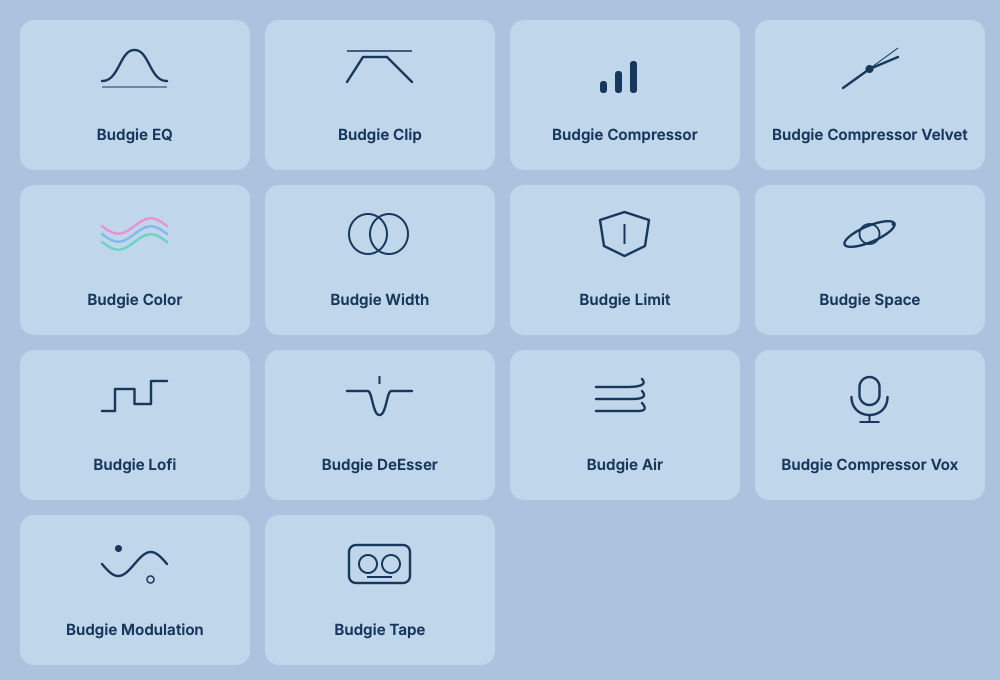
Fourteen selectable entries, organized into twelve processor families. The three Compressor editions share one family.
| Control / area | Function | Usage notes |
|---|---|---|
| Knob icon/effect name | Short press to open the effect; press and drag to move the slot. | If it's just open, click quickly; start dragging and wait until the target box is highlighted before letting go. |
| LR / M / S | The LR page determines whether the current slot handles the full, center, or side components of the previous slot's output. | This is a slot-level target; it does not change the page’s crossover. On M / S pages, slots remain assigned to the current page. |
| B | Bypasses the current effect while retaining its parameters and macro mapping. | It is used to judge the contribution of the slot; the top B is the bypass of the entire rack, with different levels. |
| Δ | Listen for differences caused by the current slot. | Difference sounds may be sharp or small, and the monitoring level should be lowered first; the delta of spatial and non-linear effects does not necessarily sound like a "deleted original sound". |
| × | Removes the effect from the slot. | If you need to reuse, copy first, or use Option/Alt to drag and copy. |
| Slot Mix | Do a wet/dry mix of any built-in or third-party effects at the rack level. | When there is a Mix inside the effect, the priority is to clarify which layer is responsible, so as to avoid the difficulty of judging the ratio due to two parallel operations. |
| Macro drag and drop | Drag the top Macro to the effect parameter to establish range, direction and curve mapping. | The mapping records the complete routing position; the instance is still followed after the slot is moved. Deleting the instance will invalidate the mapping. |
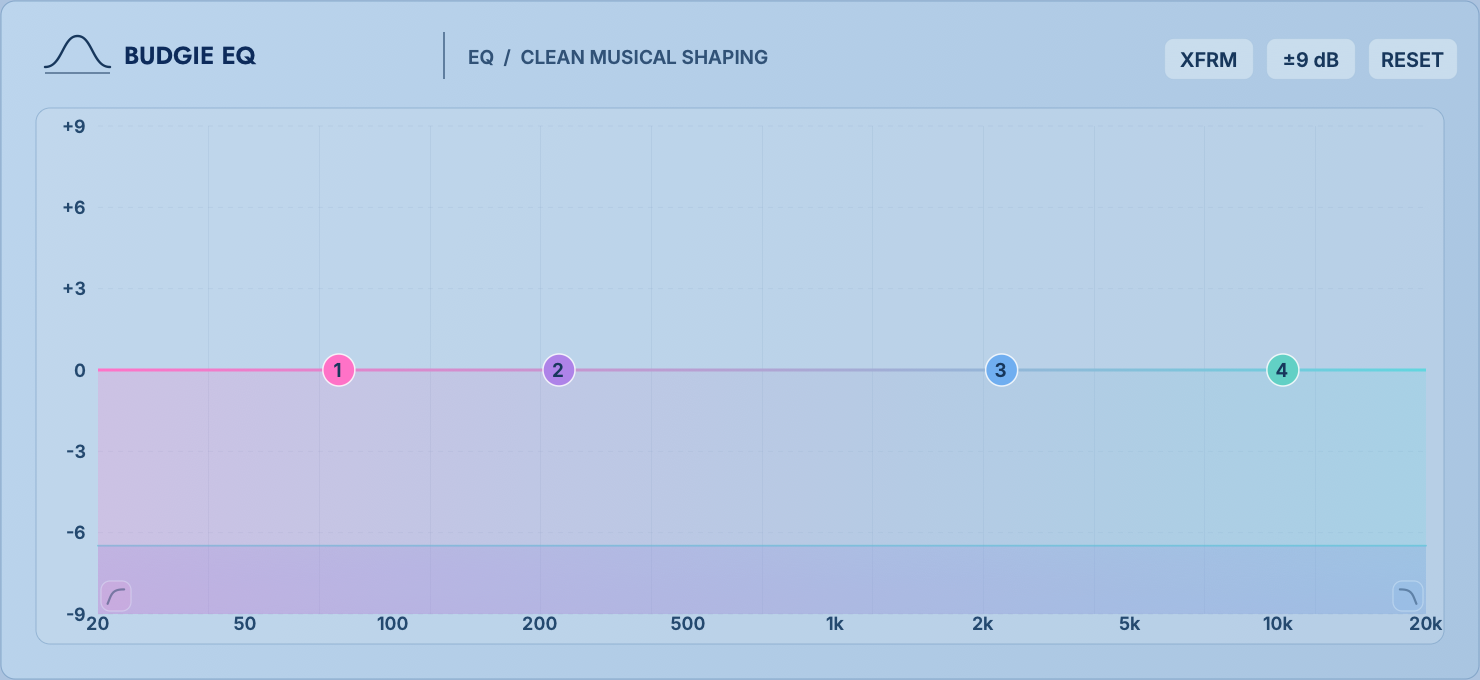
Twelve-point static / dynamic EQ with band audition and transformer coloration
 12345
12345Low, Warmth, Presence and Air are four fixed musical bands for broad shaping; eight additional points provide precise correction. The free points support Bell, Low Cut, High Cut, Tilt and Shelf. Available slopes are 6 / 12 / 18 / 24 / 30 / 36 / 48 / 72 / 96 dB/oct. Switch the display between ±9 dB and ±18 dB.
| Parameters/Operations | Function | Practical usage |
|---|---|---|
| Freq / Gain / Q | Centre frequency, boost / cut and bandwidth. Higher Q produces a narrower response. | Drag left and right to change the frequency and up and down to change the gain; stop the mouse on the frequency point and adjust the Q directly with the scroll wheel, which is suitable for narrowing while sweeping the frequency. |
| Shape/OCT | Select Bell, Cut, Tilt, Shelf; Cut's OCT determines the roll-off speed. | Extremely steep slopes are used for isolation or sound design; natural trim usually starts at 12–24 dB/oct. |
| Headphone audition | Press and hold to temporarily listen to the affected area of the frequency point. | Press and drag horizontally to sweep the frequency; release after finding a problem, and you must return to the complete mix for confirmation. |
| Right click → Spectrum | Turns the current point into a dynamic EQ working downwards. | Range limits the maximum reduction amount, and Threshold determines when to act. Right click again to close. |
| XFRM | Enable transformer-style coloration for gentle saturation, low-order harmonics and added density. | It's not another EQ curve; the higher the level, the more obvious the coloration. It is suitable for lightly densifying the bus. After turning it on, make equal loudness comparison again. |
Set the Bell at 2.5–5 kHz, right-click to turn on Spectrum; set the Range to −2 to −4 dB, and adjust the Threshold to only drop off sharp words. If every sentence is suppressed, first increase the threshold.
Press and hold the earphone and swipe left or right to confirm the resonance position; release it and make a narrow cut. Don't decide the amount of reduction based on solo listening status.
Use fixed Warmth/Presence to make small wide movements, and then turn on XFRM. If the low frequencies are muddy, it's more straightforward to reduce the level going into the EQ or turn off XFRM than to continue layering high cuts.
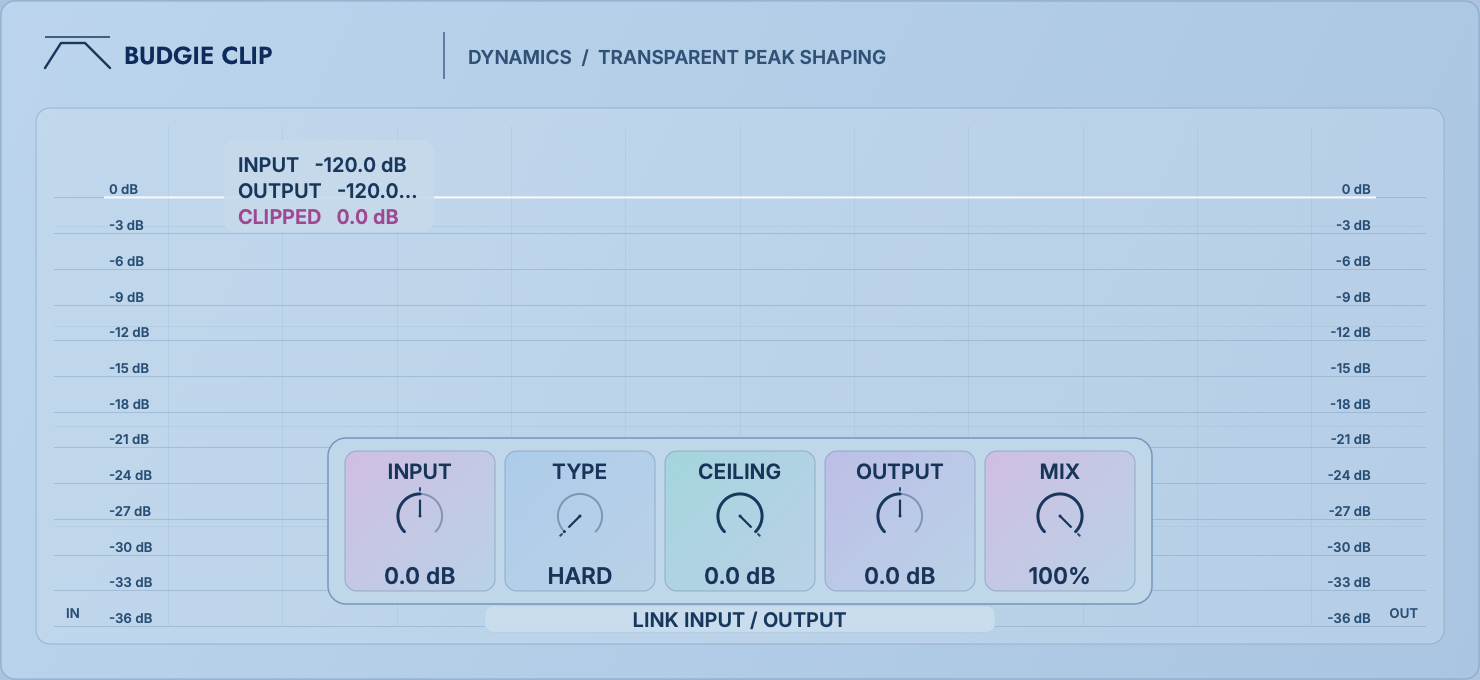
Six curves for peak reduction, loudness and harmonic shaping
 12345
12345Input drives the signal into the clipping curve, Ceiling sets its peak limit and Output matches the level. Clip acts directly on very short peaks, making it useful before a limiter to reduce the load on the final stage.
| Input | −36 to +36 dB, determines the amount of drive into the curve and is the primary control for the amount of distortion and clipping. | Ceiling | −36 to 0 dB, sets the upper limit of the allowed output peak value. |
|---|---|---|---|
| Type | Hard is the most direct; Quintic / Cubic is rounder; Tangent, Algebraic, and Arctangent provide different knees and harmonic growth. | Shape | Change the transition shape within the current curve; it should be judged based on drum beats and low-frequency tails. |
| Mix | Wet and dry in parallel. Lowering the Mix restores some of the original transients. | Output / Link | Output does the final compensation; the linkage button allows the output to be adjusted in reverse when pushing Input, making it easier to hear distortion rather than volume. |
Surround the LR low frequency band around 20–120 Hz, preferably with a Clip on the Transient branch of the Split. Ceiling First set a safety margin and slowly push the input. The goal is to shorten the kick drum peak but not collapse the bass sustain.
Start with a smoother curve to control occasional peaks, then use Mix to retain attack. If the snare image collapses, reduce Input or choose a smoother Type.
Put in Send, use Return to mix back after strong driving; you can send only the mid-frequency to avoid sub-low frequency intermodulation and top glitches from occupying the full frequency range.
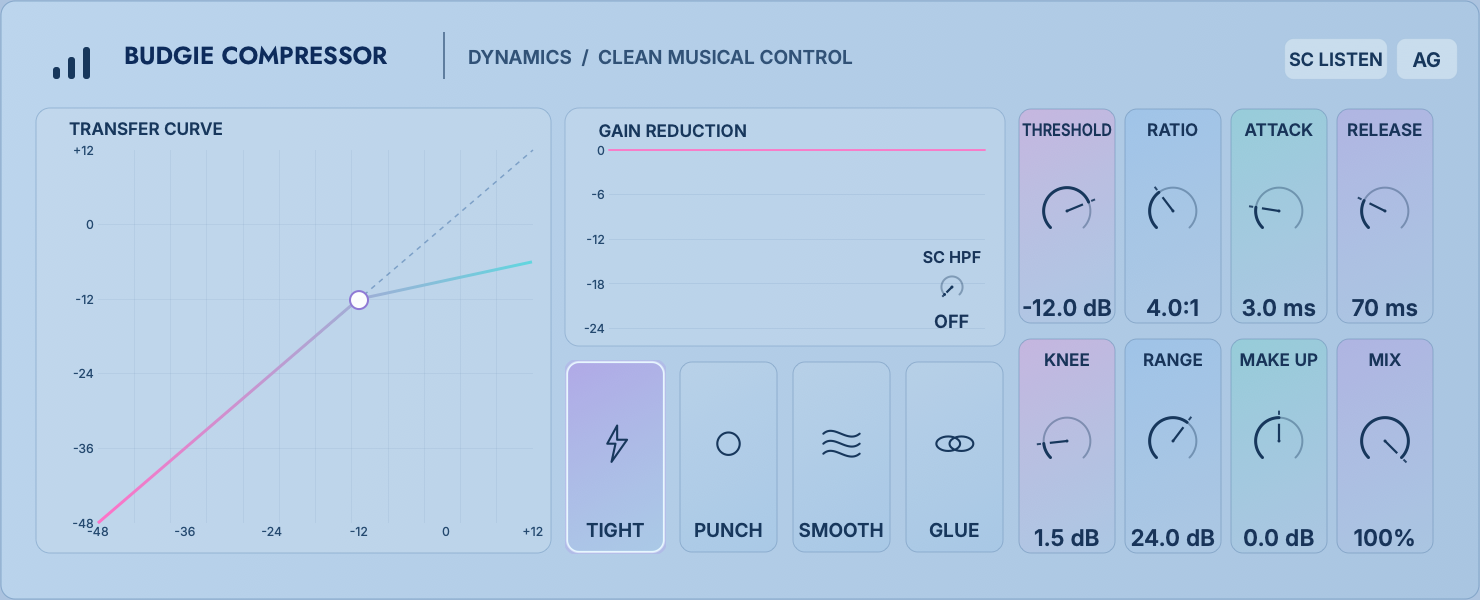
Three architectures: precise general-purpose compression, coloured feedback compression and fast vocal control
 12345
12345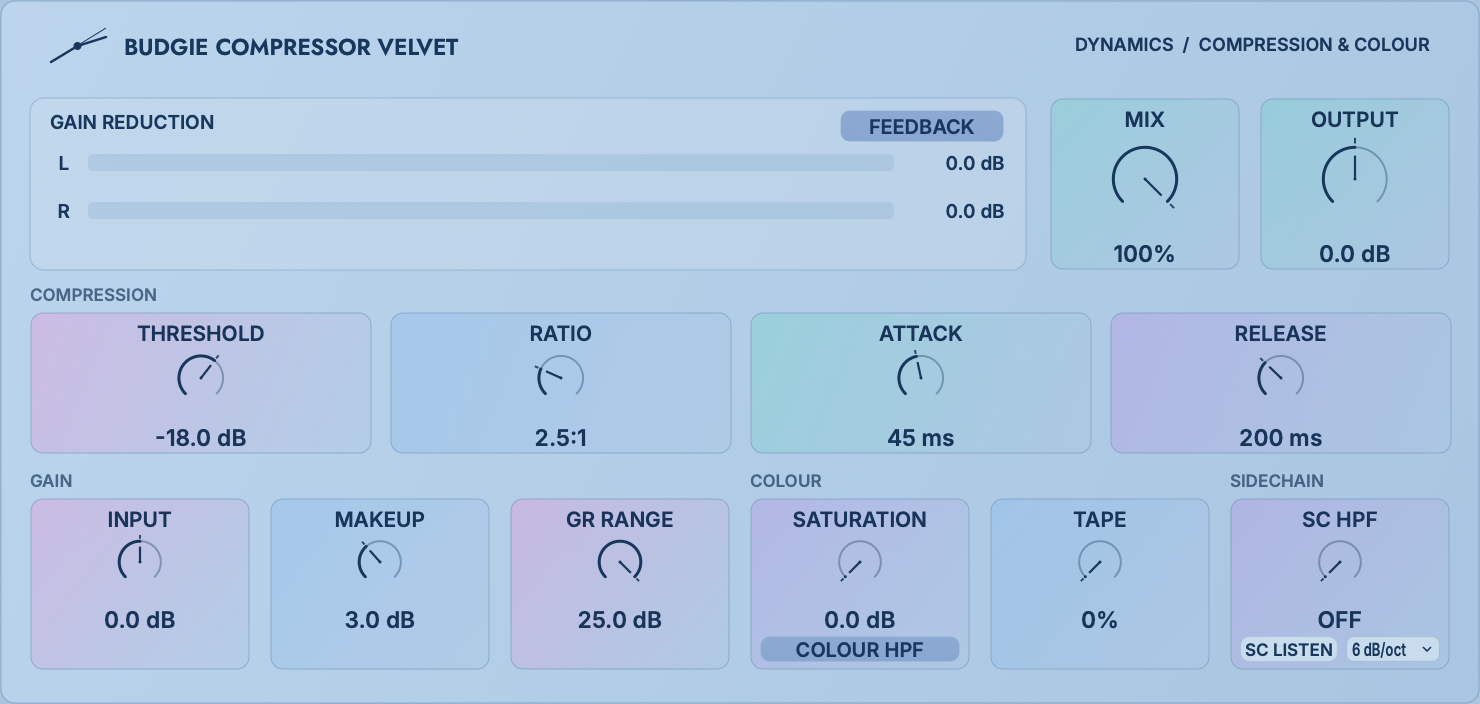 12345
12345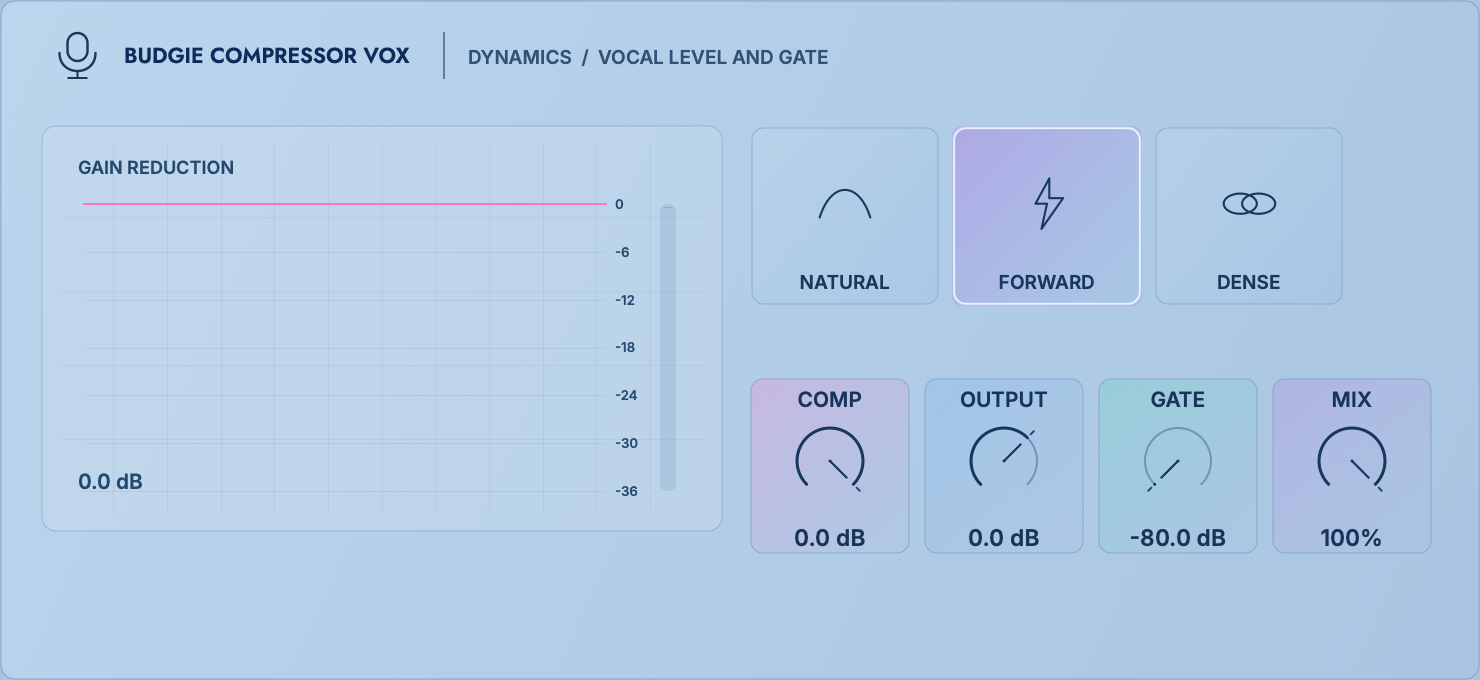 1234
1234The general-purpose edition offers the most complete parameter set. Tight uses fast peak-oriented behaviour for low-end and brief peaks; Punch preserves attack with more character; Smooth uses gentler detection for sustained material; Glue provides feedback-style bus cohesion. Threshold sets where compression starts; Ratio sets its strength above threshold; Attack / Release set onset and recovery; Knee controls the transition; Range caps gain reduction; Make Up compensates the level.
Velvet emphasizes slower movement, texture and feedback behaviour. Threshold, Ratio, Attack and Release form the compression envelope. GR Range caps attenuation. Saturation and Tape add nonlinearity. SC HPF / Slope reduce excessive low-frequency triggering; SC Listen auditions the detector signal. Mix Color determines how coloration participates in the parallel Mix. Try it on vocals, bass, drum buses or gentle mastering.
Vox is designed for fast vocal control. Comp sets compression strength; Gate controls noise and breaths between phrases; Output matches the level; Mix blends dry and processed signals. Natural preserves the original articulation, Forward emphasizes presence and stability, and Dense increases density. Establish a usable lead-vocal level quickly, then refine the tone with EQ and DeEsser.
| Control | Audible effect | Judgment method |
|---|---|---|
| Attack | The faster it is, the more it can capture the peak, and the more likely it is to weaken the attack; the slower it is, the more impact it has. | First exaggerate the Ratio, find the position where the attack is just preserved, and then return to the normal Ratio. |
| Release | Too fast can cause pumping or distortion; too slow can carry gain reduction into the next phrase or beat. | Let the gain reduction resume roughly before the next major event. |
| SC HPF / Listen | Only changes the detector, not low-cutting the audio. | Use Listen to find the low frequency that causes false triggering, and then turn off listening comparison. |
| Auto Gain / Makeup / Output | Responsible for loudness compensation, not dynamic control. | When comparing, make the bypass and processed sound the same; don't use compensation to cover up over-compression. |
Selection suggestions:Choose Compressor for precise control; Velvet for feedback behaviour, slower movement and coloration; Vox for quick control of lead or backing vocals. All three compress, but their detectors, timing ranges and tonal behaviour differ.
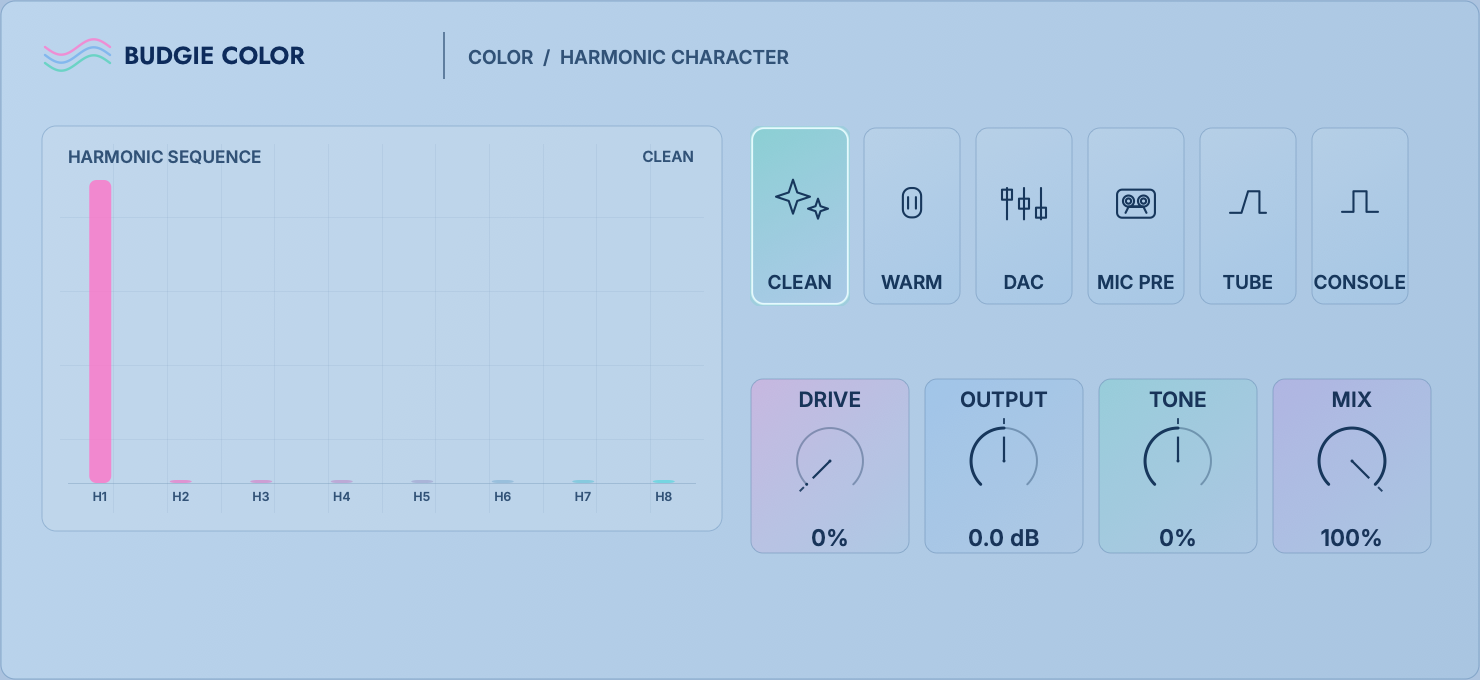
Six circuit characters for harmonic density and tonal balance
 12345
12345Drive sets nonlinear intensity; Tone shifts its emphasis toward dark or bright; Output matches loudness; Mix blends the processed signal in parallel. Clean is restrained, Warm adds body, DAC offers a digital-conversion texture, Mic Pre adds preamp density, Tube is rounder, and Console suits bus cohesion.
| Drive | Determines harmonics and compression, with low-level material requiring more Drive to be noticeable. | Tone | −100 to +100: shifts the spectral emphasis of coloration rather than applying a conventional shelf. |
|---|---|---|---|
| Output | Final trim from −18 to +18 dB. | Mix | 0–100%, preserving original transients and clarity simultaneously. |
There is no independent AG button on the Color page. Please use Output or Rack AG for a fair comparison. Low frequencies often start with Clean/Warm; Mic Pre, Tube, and Console are used for mid-frequency vocals or drum kits to make it easier to hear the character. If the sound is just louder, you should lower the Output first and then judge the mode difference.
Stereo width, centre balance, image rotation and low-frequency protection
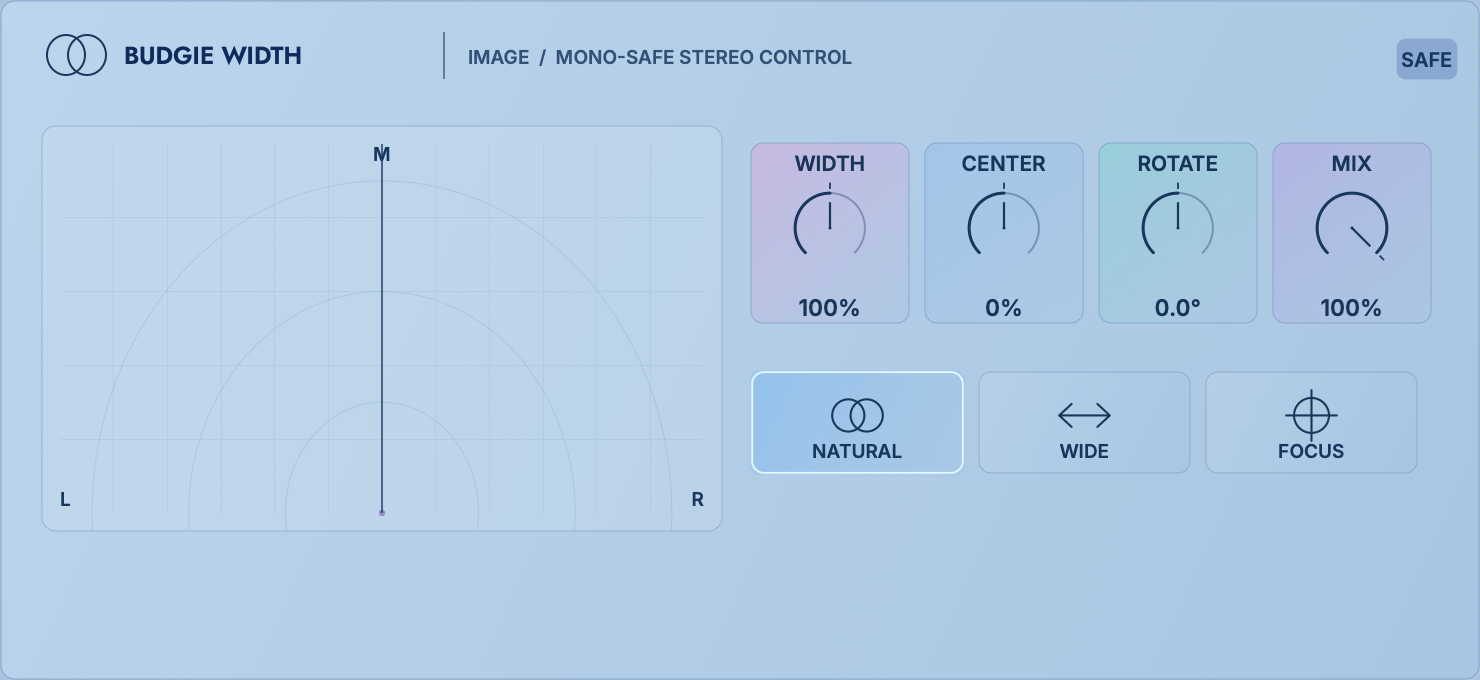 12345
12345| Width | 0% collapses to mono; 100% preserves the original width; 100–200% increases Side. | Center | Shifts the listening center of gravity between Mid and Side weights. |
|---|---|---|---|
| Rotate | −90° to +90° Rotate stereo direction to correct skew or create movement. | Mono Safe | Widths above 100% protect the low frequency center below approximately 110 Hz. |
| Mode | Natural; Wide expands more obviously; Focus tightens the sides and highlights the center. | Mix | Parallel control throughput. |
Try Wide above 1.5 kHz on the S page for backing vocals, or Focus to narrow the sides around a lead vocal. Check correlation and mono whenever widening beyond 100%. If the main sound disappears in mono, reduce Width / Rotate before considering Mono Safe.
Final peak protection, true-peak checking and loudness control
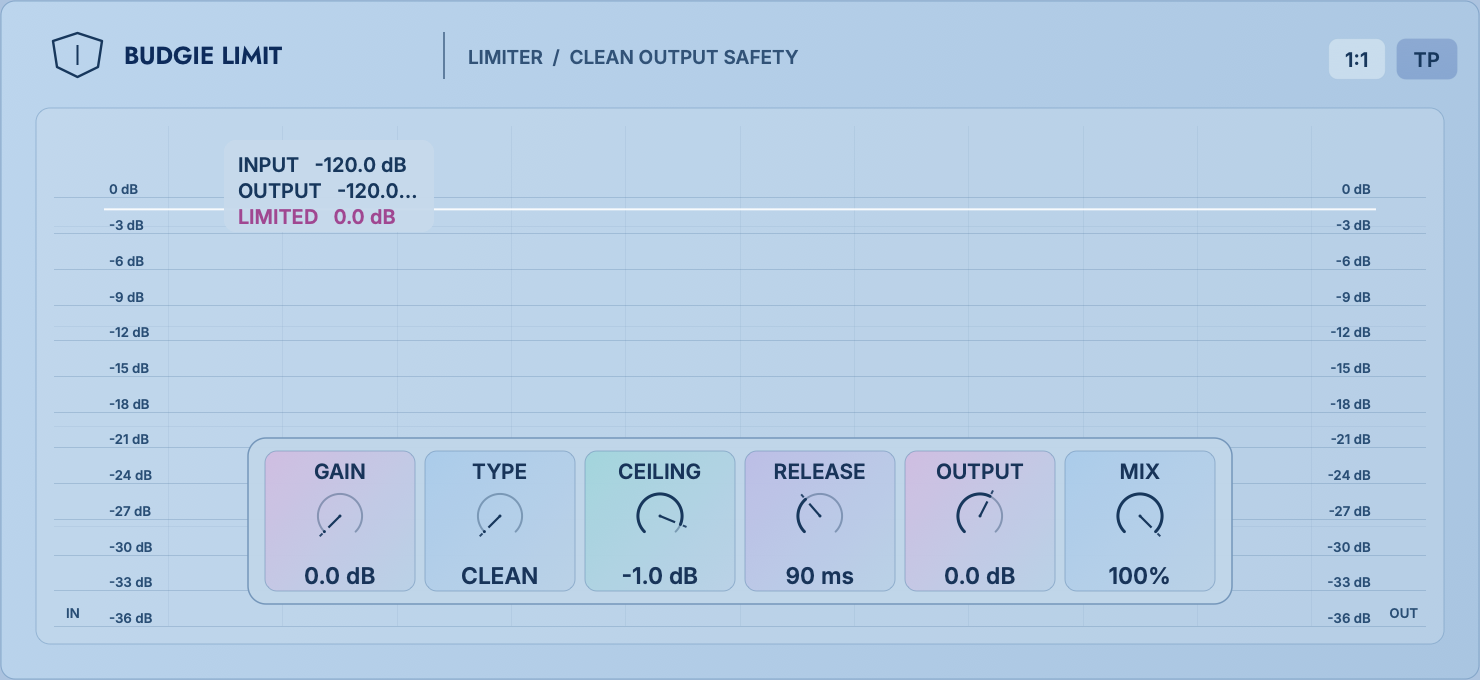 12345
12345| Gain | 0–18 dB, pushing the signal into limits. | Ceiling | −12 to 0 dB, sets the output upper limit. |
|---|---|---|---|
| Release | 20–1000 ms, determines the recovery speed after limiting. | Style | Clean is transparent; Punch is more reserved for attack; Loud is more aggressive in pursuing density. |
| True Peak | Taking into account the peak value between sampling points, it is suitable for the final output to be safe. | 1:1 Gain Compensation | Push the input and reverse the output at the same time, making it easier to compare the texture of the limit. |
| Mix / Output | Parallel processing amount and final output trim from −18 to +12 dB. | Final bus is usually 100% mix; creative parallel mix can reduce mix. | |
Normally place Limit last in FULL FX POST. Set Ceiling first, then increase Gain during the loudest passage. If drums flatten, the low end pumps or the image narrows, reduce Gain, lengthen Release or try Punch. Limit protects peaks; it cannot correct excessive bass, distortion or an unbalanced mix upstream.
An integrated reverb and delay processor with routing, filters and ducking
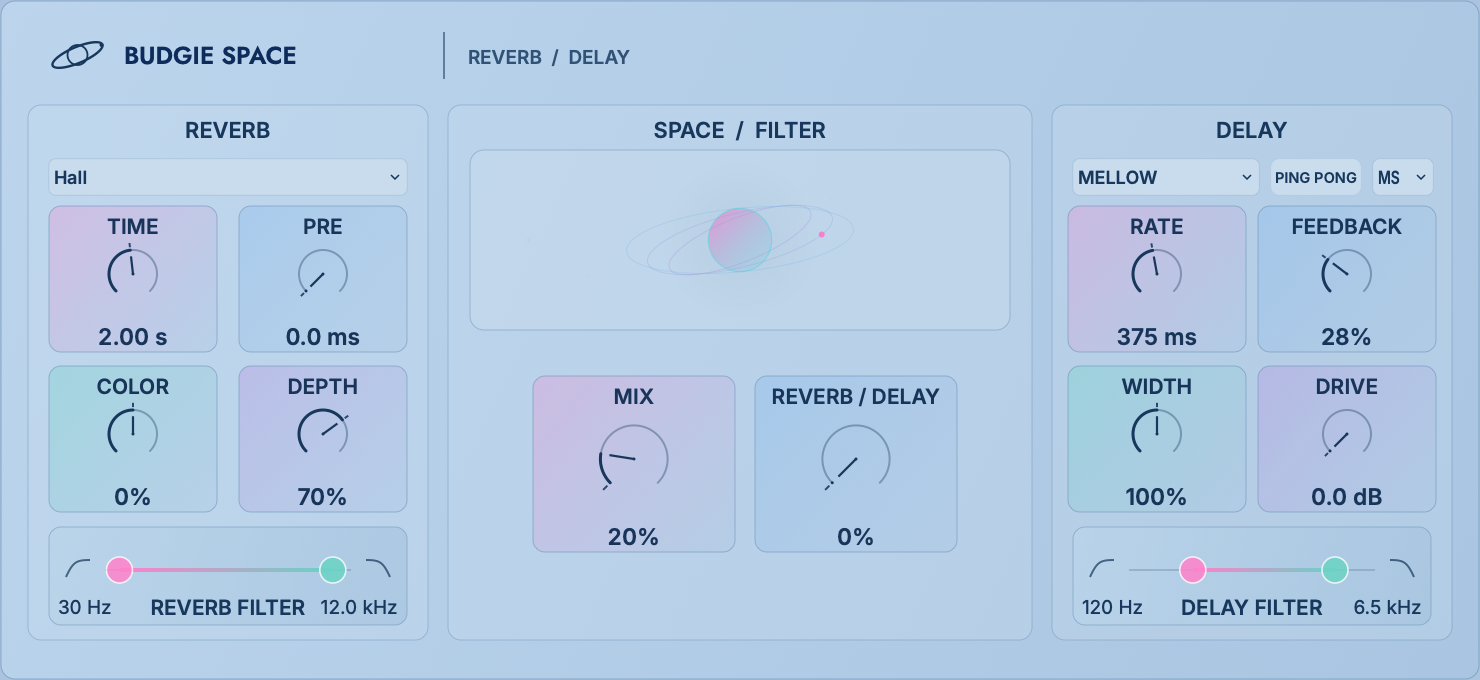 12345
12345Reverb types include Hall, Chamber, Room, Plate 140, Plate 240, Vintage, and Progenitor; delays provide Mellow, Clean, Tape, and Analog. Balance determines the ratio of reverberation and delay, and Routing determines the connection relationship between the two.
| Time / Pre | Reverb decay 0.1–10 s; predelay 0–250 ms to separate the original sound from the tail. | Depth / Color | Reverb depth and tonal brightness. |
|---|---|---|---|
| Rate / Sync / BPM / ms | Delay time in milliseconds or tempo-synced note values. | Feedback | 0–92%, determines the number of repetitions; for high values, attention should be paid to self-excitation and peak values. |
| Duck | Reduces the wet signal while the source is active, allowing tails to emerge in pauses. | Low / Mid / High Tone | Shape the tone of the wet return separately. |
| Filters | Reverb and delay each have low cut/high cut, limiting the frequencies that enter or return. | Width / Ping Pong / Drive | Control delay width, left-right alternation, and echo coloration. |
| Routing | Rev → Delay: The reverb tail enters the echo; Delay → Rev: Repeats are wrapped in space; Parallel: Both are clear. | Mix | Insert is balanced by Mix; Send is usually set to full wet, and the amount is determined by Send / Return. |
Put Space on the Send above about 4 kHz, select Plate or Chamber, and make it 100% wet; use Low Cut to clear the main body, High Cut to suppress the hiss, and add Duck to let the tail expand only at the end of the word.
Only sends about 250 Hz–3 kHz, Sync is set to 1/8 or a dotted value, feedback starts low, and cuts high to make it darker. The main body remains clear and repetitions do not occupy low frequencies and airy areas.
Delay→Rev, higher Feedback, longer Time; put it on Tonal Send, allowing sustained sounds to enter the space and transients to stay close.
Five media, fifteen scenes and repeatable random textures
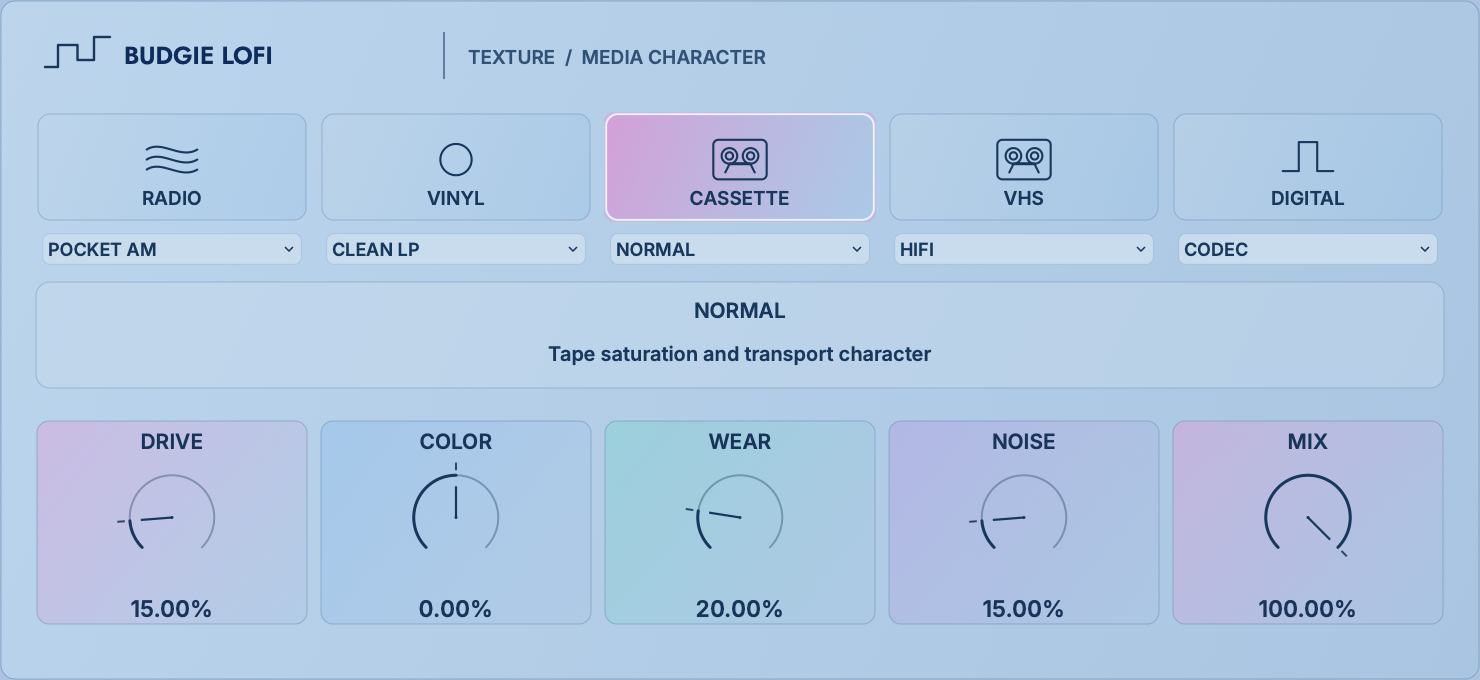 12345
12345Radio: Pocket AM / FM Air / Shortwave; Vinyl: Clean LP / Worn / Dusty; Cassette: Chrome / Normal / Micro; VHS: HiFi / Home / Tracking; Digital: 12-bit / Digital / Codec. When switching Mode, each scene saves its own parameter status.
| Drive | Medium saturation and density. | Color | Spectral shading and bandwidth character. |
|---|---|---|---|
| Wear / Bits | Simulates media wear, or bit depth degradation in Digital mode. | Noise / Rate | Amount of noise, or digital sample rate/rate texture. |
| Texture Seed | Vary the random noise and texture patterns; the same value can be repeated to get the same tone. | Mix | How much of the original clarity is retained. |
Telephone sounds can be Radio-only in the 300 Hz–4 kHz mid-band; old samples can be Cassette/Vinyl on the Tonal branch to keep transients fresh; fills can be Macro-mapped to Wear, Color, and Mix for playable transitions from clean to damaged.
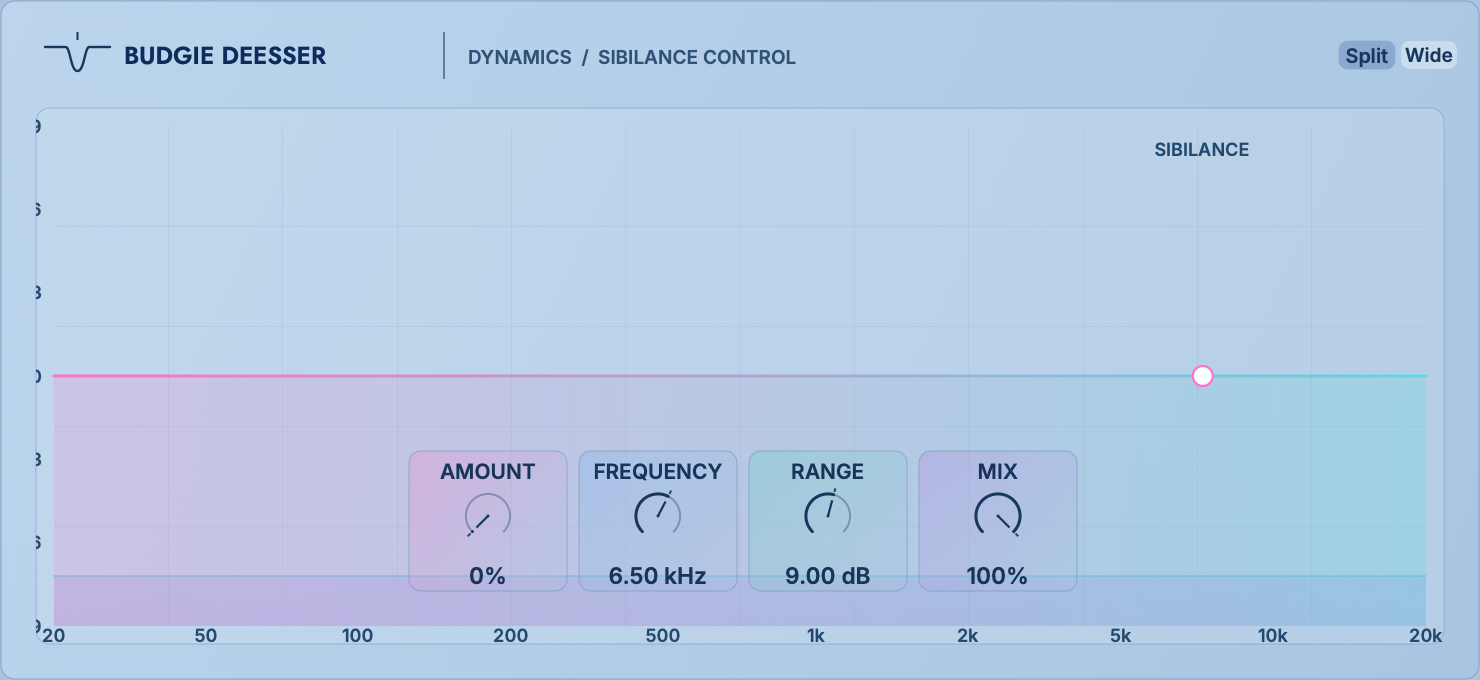
Sibilance control with split-band or wideband attenuation
 12345
12345| Amount | 0–100%, detection and processing intensity. | Frequency | 1–18 kHz, locks on sibilance/harsh center. |
|---|---|---|---|
| Range | 0–24 dB, limits maximum cutback, preventing sudden collapse. | Mix | Parallel restoration of part of the original brightness. |
| Split | By reducing only the target high frequencies, the subject level is more stable and often more transparent. | Wide | The entire broadband attenuation is triggered by the sibilance, making it sound more like a singer naturally holding back the syllable. |
Temporarily raise Amount and sweep Frequency to locate the harshest sibilance. Then reduce Amount and Range until processing acts only on problem syllables. Female voices often require a higher target than male voices, but listen rather than relying on a fixed frequency. DeEsser → Air is a useful starting order. If Air adds high frequencies that also need control, follow it with gentle dynamic EQ.
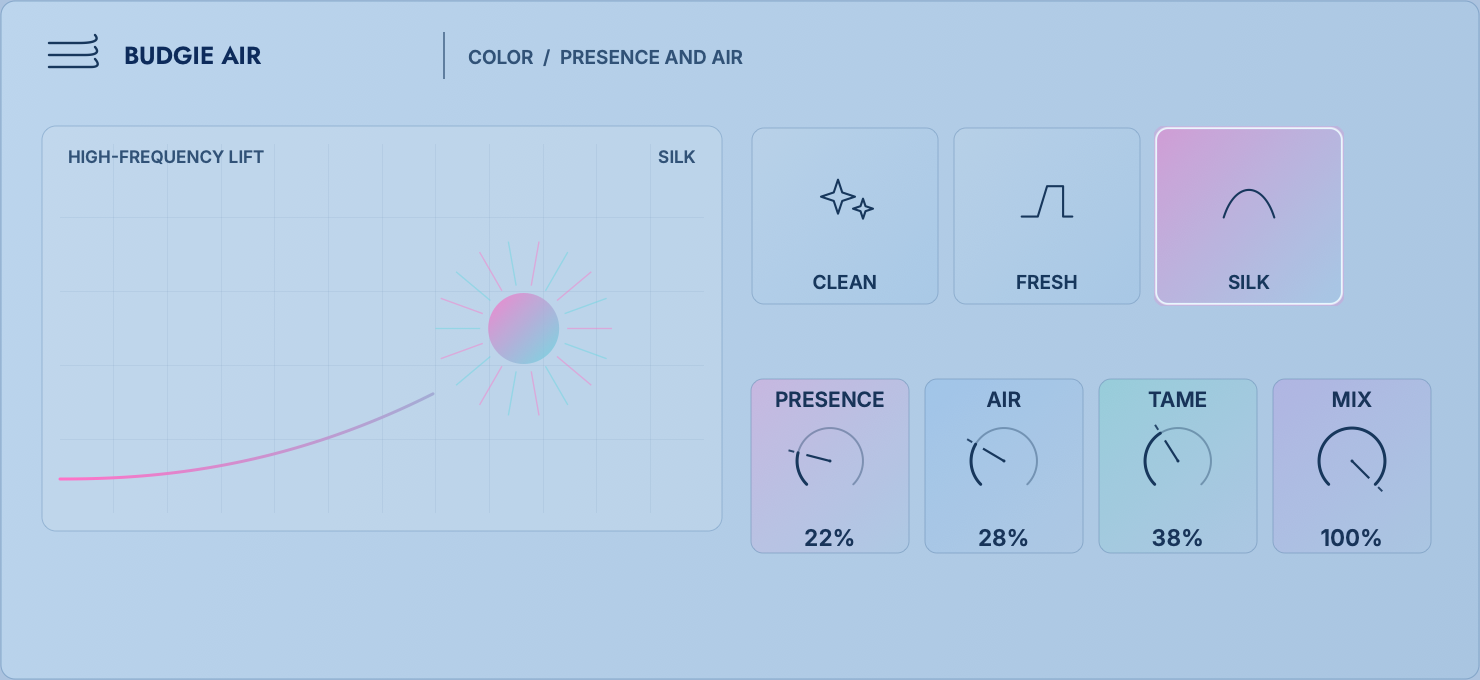
Integrated shaping of presence, air and high-frequency taming
 12345
12345Presence brings vocals and instruments forward; Air opens the top end; Tame controls the hardness, thinness and harshness that brightening can expose. Clean is direct, Fresh is more vivid, and Silk is smoother. Start from Soft Air, Vocal Forward, Drum Shine, Dark Mix Lift, Silky Master or Fresh Pop.
usage:Set Presence for clear articulation, slowly add Air, then use Tame to control harshness. Processing only a high band offers more control than processing the full signal. Use subtle settings for mastering; darker vocals may need more. Tame handles persistent hardness, while DeEsser targets specific sibilant consonants.
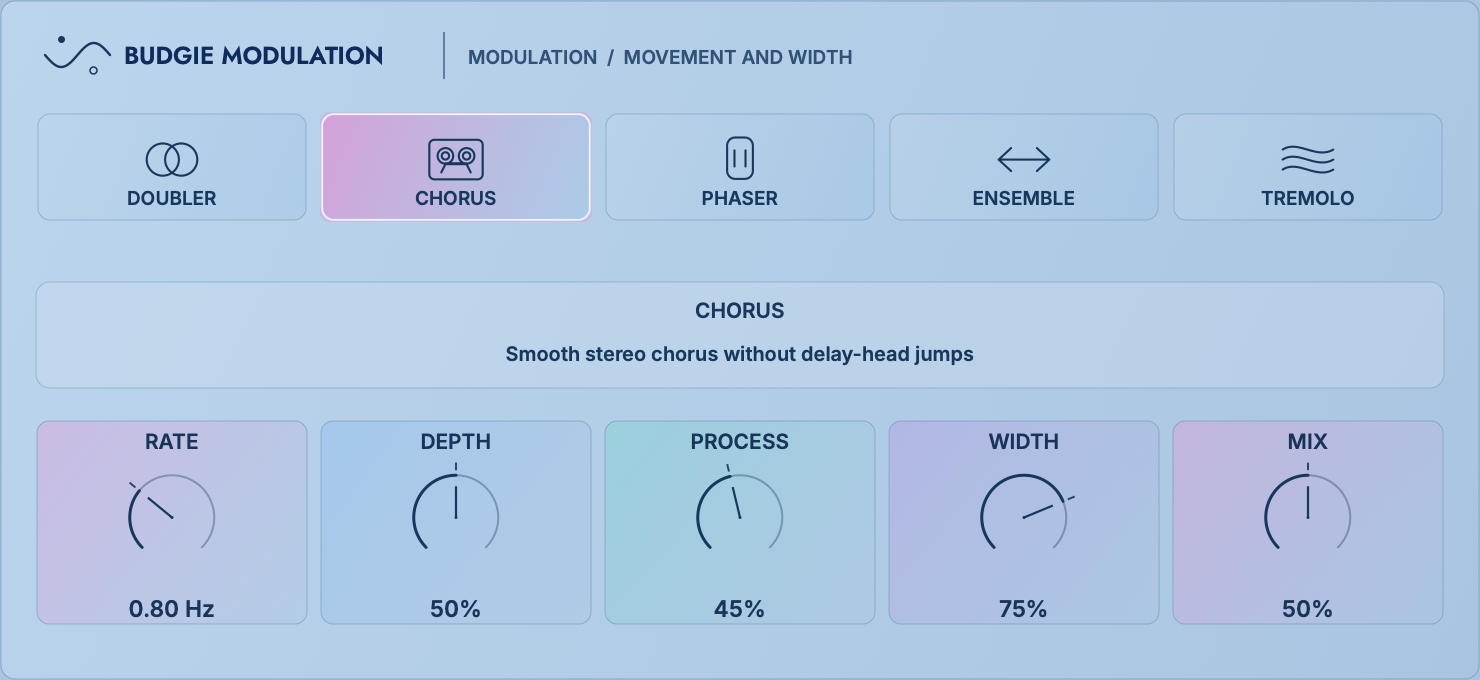
Doubling, chorus, phasing, ensemble and tremolo
 12345
12345| Rate | 0.05–12 Hz, motion speed. | Depth | modulation amplitude. |
|---|---|---|---|
| Process | Changes the selected mode’s internal intensity, feedback or waveform. In Tremolo, lower settings approach a sine wave, middle settings a triangle, and higher settings a square wave. | Width | Stereo separation; Tremolo produces more noticeable side-to-side motion past the midpoint. |
| Doubler | A small time change of about 16 ms, suitable for vocal thickening. | Chorus | Tighter chorus around 9 ms. |
| Ensemble | Approximately 22 ms multi-voice drift, wider range. | Phaser / Tremolo | Eight levels of phase-shifting motion/periodic volume changes. |
The lead vocal only needs a small amount of Doubler; the background harmony can use Ensemble on the S page or the mid-to-high frequency band; if the bass needs movement, it can only modulate the high-frequency harmonics and retain the low-frequency center. By mapping the Modulation Mix and Space Send of the Tonal branch to the same Macro, you can perform continuous actions of "from close to drift".
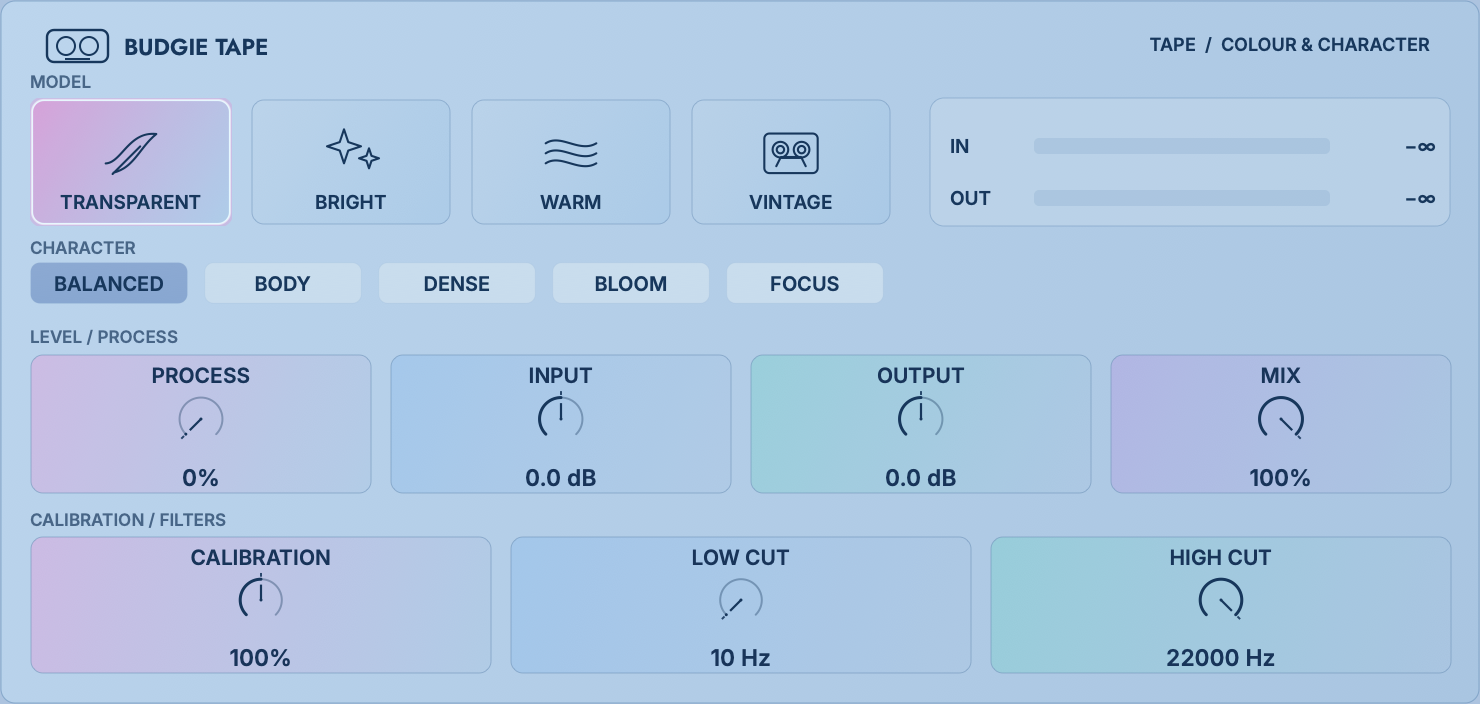
Tape models, drive calibration, character and bandwidth control
 12345
12345Transparent, Bright, Warm, and Vintage determine the overall model; Balanced, Body, Dense, Bloom, and Focus determine the focus of processing. First select the model and Character, then use Process to determine the effect amount, and finally do input and output matching.
| Process | 0–100% overall tape processing amount. | Drive Calibration | 50–150%: adjusts the reference at which the model begins to saturate noticeably. |
|---|---|---|---|
| Input / Output | ±24 dB each. Input sets how hard the tape is driven; Output compensates the resulting level. | Mix | Original clarity and attack are preserved in parallel. |
| Low / High Cut | Limits the bandwidth into the tape color path; Post Filters determine filter placement. | Charge / Tone | Adjust energy and tonal brightness. |
| Vintage Curve | Classic / Tight / Thick。 | Vintage Scale | Classic / Guard / Push, change the drive scale and protection level of Vintage. |
| Vintage Character / HOT | Enable stronger vintage behaviour and additional drive. | Beginning at low volumes, pay special attention to low-frequency bloating and high-frequency blunting. | |
Warm + Body with modest Process. Use Low Cut to keep plosives from overdriving the tape, and Output to match bypass loudness.
Transparent / Vintage + Balanced, lowers the spike before pushing Input; Mix retains part of the original attack.
Try Vintage with Thick / Push and a lower High Cut. Combine Tape with Lofi Cassette: let Tape provide compression and harmonics while Lofi supplies wear and noise.
11
Design signal behavior first, then select effects; you can create a reusable system with an empty rack.
Define a result such as “steady, forward lead vocals with spacious endings”, “a louder master without shortening the kick”, or “wider backing vocals with a stable centre”. Describe the sound and its limits before choosing processors.
Use LR single segment first. If only a certain frequency range needs to be processed independently, add another frequency band; enter M/S only if the center and sides require different actions; turn on Split only if attack and sustain require different chains. This makes it easier to hear the cause and effect of each step.
Use Insert to directly change the main body; use Send if you need parallel mix, tail or feedback network; use FULL FX if you must observe the complete spectrum, unified ending or final protection. Nonlinear effects placed in PRE and POST will get different driving results.
A typical sequence is EQ / DeEsser → Compressor / Clip → Color / Tape / Air → Modulation / Space → Limit. It's not a hard rule: for example, tape first and then compressor will make the compressor respond to added harmonics, while compressing first and then tape will be more stable.
Each additional processor matches bypass loudness; the loudest segments check for peaks; space and feedback check for tails after playback is stopped. Finally, use rack AG to measure and lock for three seconds, and then use B and Δ to judge.
Combine multiple established parameters into an auditory action. Set the safe range and forward and reverse directions, check 0%, 50%, 100%; do not use Macro to remedy multiple unresolved issues at the same time.
Idea:Use broad EQ in FULL FX PRE, gentle Clip on the LR low-band Transient branch, light mid-band Glue and high-band dynamic EQ for harshness. Finish with Limit in FULL FX POST.
Check:Once the loudness is matched, there should be no significant reduction in bass length, snare attack, panning, and mono.
Idea:EQ Cleanup → Vox Stability → DeEsser → Color/Air; high-frequency Send is placed on Plate, mid-frequency Send is placed on Synchronized Delay. Use Macro to link Presence and Space in reverse to complete changes in near and far.
Check:Listen separately to consonants, breaths, sentence endings, plosives and the loudest high note.
Idea:Turn on Split; put Punch Compressor/Clip on Transient, and put Smooth or Velvet on Tonal; add short Room to mid-high frequency Tonal Send, and light Limit to FULL FX POST.
Check:Transient solo listening is used for setting, and ultimately the complete drum kit and bass are played at the same time.
Idea:Low-frequency M lightly compresses to stabilize the fundamental; use Color/Tape in the mid-range to produce harmonics that can be heard in small loudspeakers; use dynamic EQ to control certain notes if necessary. The width is left only for high-frequency noise and texture.
Check:Level consistency at low volumes, mono, and between different pitches.
Idea:The Tonal branch adds Ensemble and Tape, and then sends it to the long Hall; the Transient is kept dry. The S page adds wider space to the high frequency, and the M page retains the main body positioning.
Check:Check correlation, tail peaks and whether the ambience masks the next phrase.
Idea:Mid-frequency Lofi + Tape, Tonal plus Modulation, Send plus high feedback Delay. A Macro pushes Wear, Feedback, Mix forward, and reduces dry high frequencies or Output in reverse.
Check:Macro extremes cannot create runaway feedback; use Range to cap each target.
12
The following values are starting points; band boundaries and thresholds must follow the material.
Why it works:The clipping only falls on the low-frequency transient branch, preventing the full-range cymbals from producing clipping harmonics with the human voice, and also retains the low-frequency sustained part.
Creative extension:Map Air, Space Send, and Duck to the "Shimmer" Macro: Increase the Air and Send while increasing the Duck for a bright but unobstructed space.
Creative extension:Delay→Rev will put each repetition into the same space; Rev→Delay will make the entire group of tails repeat, which is more dreamy and easier to crowd.
13
Preset names describe the sound, and their Macro order follows a practical mixing workflow.
Warmth → Compression → Clarity → Brightness → De-esser → Modulation → Echo → Space
Thickness → Dynamics → Coloration → Clarity → De-esser → Brightness → Echo → Space
Attack strength → Low frequency strength → Snare clarity → Graininess → Softness → Modulation → Echo → Space
Tape wear → high frequency attenuation → drift → thickness → gentle compression → mid frequency contour → echo → space
Air → Articulation → Chorus → Dynamic → Thickness → Coloration → Echo → Space
Distortion → Parallel Compression → Low Frequency Thickness → Mid Frequency Bite → Modulation → High Frequency Softening → Echo → Space
When loading a new version of Factory, the old factory presets with the same name will be backed up first; effects and parameters already saved in the project will not be automatically overwritten.
14
Remember less shortcut keys and rely more on consistent interactions.
| Action | Result | Usage suggestions |
|---|---|---|
| Click an effect | Open in embedded workspace | A short press is responsible for opening; press and hold for about 350 ms before dragging to avoid accidental loading. |
| Drag effect slot | Rearrange, or move to band, Insert / Send, LR / M / S, Full / Transient / Tonal | Release only when the destination highlights. For transfers involving FULL FX, use Add Effect or Copy / Paste. |
| Shift + drag knob | Fine adjustment | Fits Threshold, Q, Output and Macro ranges. |
| Double click on the value | Enter exact value | Different parameters will retain the interpretation of units such as Hz, dB, ms, etc. |
| Double click the knob | Return to the defined default / preset value | A blank macro has no forced starting point and therefore does not display a starting tick. |
| B | Bypass the current slot, chain or entire rack | Observe the level of the button to avoid confusing slot B with global B. |
| Δ | Listening differences | Reduce the monitoring volume first; strong distortion and delay will produce obvious differences in sound. |
| Undo/Redo | Restore parameter, routing and effects chain editing | A/B is used to compare two plans, and Undo is used for rollback operations. They have different purposes. |
15
Current macOS delivery information.
Apple Silicon and Intel Macs running macOS 12 or later. The universal build automatically runs the architecture appropriate for your Mac.
Audio Unit, VST3 and Standalone can be selected separately in the installer.
Log in and manage devices through Budgie Hub; start a 14-day trial from the plug-in authorization page.
16
Locate the routing first, then determine the effects.
Check whether you are currently editing LR, M or S; make sure the correct Insert / Send / FULL FX is selected, there is no Bypass or Mute in the slot and band, and the total Mix and Band Mix are not 0.
Zeroing the send volume will stop new input, but sounds that have entered the delay or reverb network will naturally decay. This is a normal spatial tail.
Dynamic spectrum processing requires analysis and look-ahead, and the host should be aligned via plug-in delay compensation. You can turn off unnecessary Spectrum points when recording and monitoring, and turn them back on when mixing.
Try adjusting MB Rack scaling first; if it still doesn't work, switch to a separate window. Built-in Budgie Essentials always uses an in-rack interface.
The default mode locks compensation after three seconds of active audio. If continuous automatic mode is enabled in Settings, switch back to three-second measurement mode.
Reduce heavy third-party plug-ins, oversampling levels, dynamic spectrum points, and unnecessary frequency bands running simultaneously. Hidden analysis views stop their display calculations, but audio processing still runs as required by the link.
BUDGIE MB RACK
Find a direction in Simple, then refine each change in Advanced.
No relevant content found. Try searching for "Macro" "Send" "Vocal" or the effect name.